
Wordfence 9.1.0 is now available. It adds the new Wordfence Security News Widget, which brings the latest WordPress security alerts and research to your dashboard, plus faster firewall rule updates, sharper firewall request parsing, Live Traffic logging for application password and REST API login failures, configurable attack alert thresholds, and additional features, fixes and improvements.
Attackers often hide payloads in malformed or deeply nested input, counting on a firewall reading a request differently than WordPress does. We’ve improved request parsing to narrow that gap, so the firewall inspects that input more like the way WordPress reads it. The firewall also checks for rule updates more often, so new firewall rules reach your site sooner.
Live Traffic now logs failed logins through application passwords and the REST API, two ways in that skip wp-login.php. You also get configurable thresholds for WAF attack alerts, so you decide how much attack activity it takes to trigger an alert.
Rounding out the release: PHP 8.6 compatibility and reliability fixes for unusual hosting environments.
Here’s what’s in Wordfence 9.1.0 and what it means for your site.
In This Post
- Stay Current With the New Wordfence Security News Widget
- Stronger Firewall Protection
- More Visibility and Control
- Fixes and Minor Improvements
- How to Update to Wordfence 9.1.0
- FAQ
Stay Current With the New Wordfence Security News Widget
At Wordfence, our commitment to Defense in Depth means taking a layered approach to security. One of those layers is original threat research. That includes our internal threat research team, the Wordfence Bug Bounty Program, and leading the way in AI threat research with Argus, Prism, and other internal tools and processes.
We use that research and intelligence to protect our users. Our team turns it into firewall rules and malware signatures that reach Premium customers in real time and Free users after a standard 30-day delay, protecting sites against vulnerabilities, sometimes before an official patch even exists.
Beyond that, we make the research available for free: in posts on the Wordfence blog, in security updates through the WordPress Security Newsletter, and in educational content on our social media channels.
But you shouldn’t have to go looking for the alerts that matter to your site. So we built the Wordfence Security News Widget to bring them to you.
Introducing the Wordfence Security News Widget
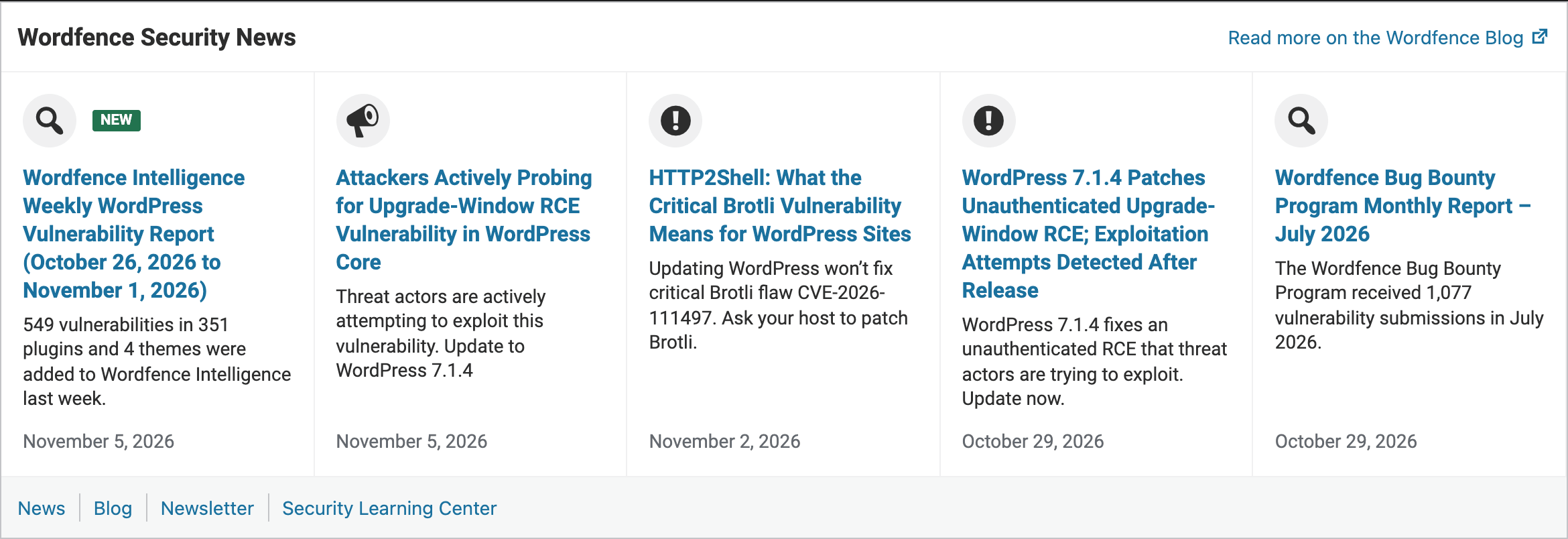
The Wordfence Security News panel on the Wordfence dashboard.
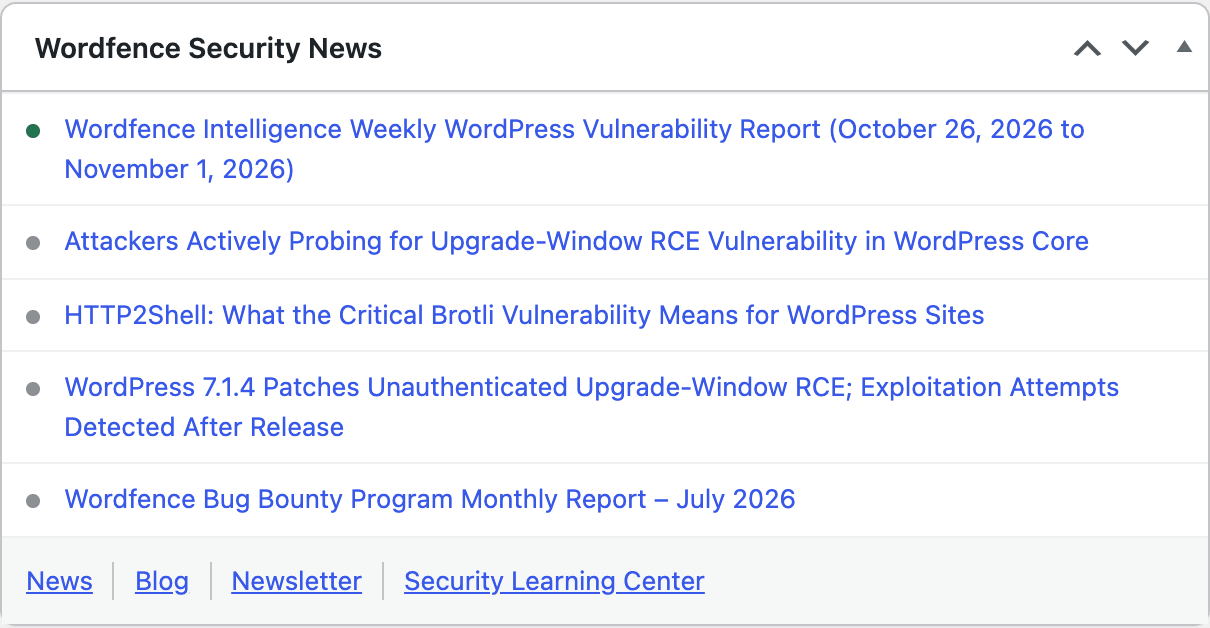
The Compact layout shows headlines only.
The Wordfence Security News Widget brings that research to the place you already go to manage your site: your WordPress dashboard and your Wordfence dashboard. It shows the latest posts from the Wordfence blog, so new alerts reach you without having to visit the blog, open a newsletter or follow us on social media.
Links to our news, blog, newsletter and Security Learning Center sit at the bottom of the widget, so it’s easy to go deeper or subscribe to the channels you prefer. And like the research itself, it’s free for every Wordfence user.
Availability: All Wordfence users, on every license.
How to use it: Once you’ve updated to 9.1.0, the widget is turned on for both dashboards. To customize it, go to Wordfence → Dashboard → Global Options and expand the Wordfence Security News section.
There you can turn it on or off separately for each dashboard, and choose the Rich layout, with post summaries, or the more condensed Compact layout.
Stronger Firewall Protection
Firewall Rules Reach Your Site Sooner
In 9.1.0, your site checks for rule updates more often, so when our Threat Intelligence team ships a new rule, your site picks it up sooner. That helps shorten the gap between a new threat being identified and your firewall protecting against it.
Availability: All Wordfence users, Free and Premium. Both check for rule updates more often. Premium sites receive new rules in real time, and Free sites receive them after the standard 30-day delay.
Sharper Detection in the Firewall and Scanner
Several changes bring Wordfence’s view of requests closer to how WordPress reads them:
- Better SQL injection detection for malformed input. Improved parsing helps the firewall catch injection attempts that are deliberately malformed to slip past inspection.
- Method override matching. WordPress lets some requests override their HTTP method. The firewall now inspects form request bodies using the same method overrides, so what it inspects lines up more closely with what WordPress acts on.
- Nested request arrays. The firewall handles deeply nested request data more reliably.
- Upload scanning. The malware scanner handles uploads better.
Availability: All Wordfence users. These changes come with the update, and there’s no setting to turn on.
More Visibility and Control
See Application Password and REST API Login Failures in Live Traffic
Not every login attempt goes through wp-login.php. Attackers also try credentials against application passwords and REST API authentication. Live Traffic now logs those failures too, so you get a fuller picture of who is trying to get into your site and how.
Availability: All Wordfence users.
How to use it: Go to Wordfence → Tools → Live Traffic, click Show Advanced Filters, then Add Filter, choose the new Authentication filter, and look for the new authentication failure entries.
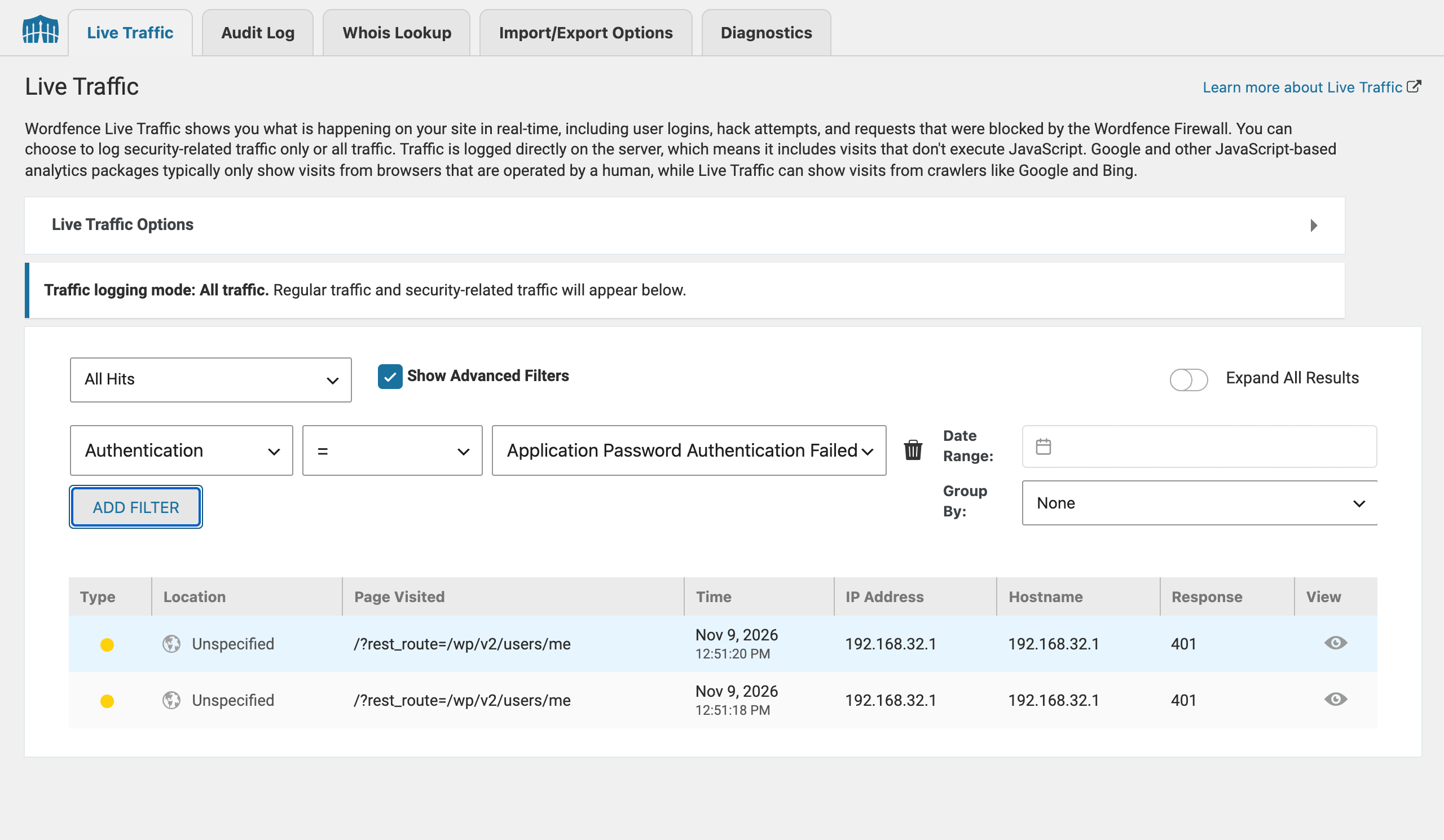
Live Traffic filtered by Authentication, showing failed REST API logins that used an application password, each returned as 401.

Close-up: two failed application password logins against the REST API, each answered with a 401.
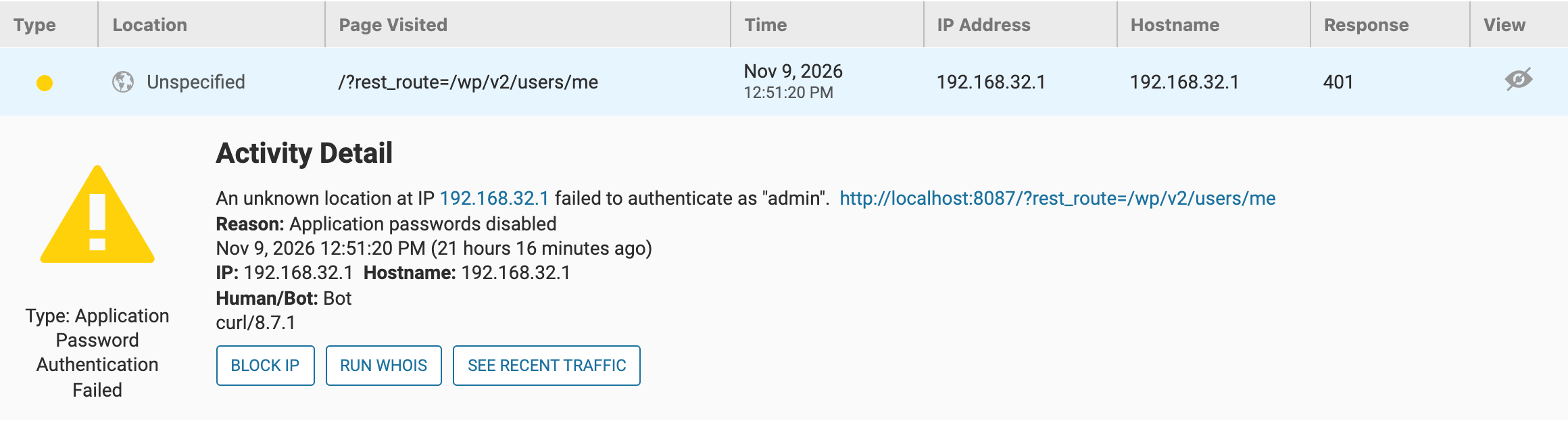
Click a yellow row to see the details: who tried to sign in, as which user, why it failed, and buttons to block the IP or look it up.
Control How Often Attack Alerts Fire
If you manage a busy site, or a lot of sites, attack alerts can pile up. You can now set the WAF attack alert threshold and the counting window: how many attacks within how much time it takes to trigger an alert. Raise the threshold to cut the noise, or lower it if you want to hear about smaller bursts.
Availability: All Wordfence users, Free and Premium.
How to use it: Go to Wordfence → Dashboard → Global Options → Email Alert Preferences. Under “Alert me when there’s a large increase in attacks detected on my site,” set Number of attacks before sending an alert and Attack counting window (minutes). Raising the threshold reduces alert sensitivity.

The new Number of attacks before sending an alert and Attack counting window (minutes) fields, under Email Alert Preferences.
Fixes and Minor Improvements
- PHP 8.6 compatibility
- More reliable firewall on unusual hosting, including hosts that disable ini_set and servers that send PHP diagnostic output
- Lighter attack data syncing that reduces overhead and helps avoid cache issues
- Better validation of cached real-time IP blocklist data
- Better 2FA recovery code validation
- reCAPTCHA keys revalidated on save, with better recovery from browser errors
- Adjusted audit log request data handling and limits
- Scan activity log uses your site’s timezone and shows the UTC offset
- Better handling of canceled requests to avoid unnecessary errors and stuck controls
- Passkey availability checks are better protected from errors when database setup is incomplete or broken
- Corrected Live Traffic descriptions for requests without a referrer
- UI fixes, including the satisfaction survey notice layout and dismissal
- Updated GeoIP database
How to Update to Wordfence 9.1.0
If you have automatic plugin updates turned on, your site will update on its own. To update manually, go to Dashboard → Updates (or Plugins) in WordPress and click Update next to Wordfence Security.

If you manage several sites, your site management tool can update them in bulk, and Wordfence Central shows the security status of all your connected sites in one place.
FAQ
Do I need to change any settings after updating?
No. Everything in 9.1.0 is on by default. There are two optional settings you may want to adjust: the widget’s layout or visibility (Global Options → Wordfence Security News) and the attack alert threshold (Global Options → Email Alert Preferences).
Is Wordfence 9.1.0 compatible with PHP 8.6?
Yes. This release includes PHP 8.6 compatibility fixes.
Can I customize the Wordfence Security News Widget?
Yes. You can turn the news on or off separately for the WordPress dashboard and the Wordfence dashboard, and choose a Rich layout with summaries or a more condensed Compact layout, in Wordfence → Dashboard → Global Options. See the Wordfence Security News help page for details.
Get the Most From Wordfence
Update to Wordfence 9.1.0 today. For real-time firewall rule and malware signature updates, upgrade to Wordfence Premium.
Want our team to handle your site’s security for you? Wordfence Care and Wordfence Response add hands-on help from our security analysts, including malware removal if your site is ever hacked.
Questions about this release? Free users can get help in our WordPress.org support forums, and paid customers can reach us through our ticket system. You’re welcome to comment below, but our support team doesn’t monitor blog comments.
Thanks for choosing Wordfence!
Wordfence 9.1.0 Full Changelog
Wordfence 9.1.0 – November 9, 2026 (view on WordPress.org)
- Improvement: Added security news widget to the WordPress and Wordfence dashboards
- Improvement: Increased frequency of WAF rule update checks
- Improvement: Added Live Traffic logging for application password and REST API authentication failures
- Improvement: Added controls for the WAF attack alert threshold and counting window
- Improvement: Improved attack data synchronization to reduce overhead and avoid cache issues
- Improvement: Improved SQL injection parsing and detection for malformed input
- Improvement: Improved malware scanning handling of uploads
- Improvement: Improved WAF execution and configuration handling in unexpected hosting configurations or unreliable network environments
- Improvement: Updated GeoIP database
- Change: Matched WAF inspection of form request bodies to the same method overrides as WordPress
- Change: Better 2FA recovery code validation
- Change: Adjusted audit log request data handling and limits
- Change: Better handling of PHP diagnostic output during WAF execution
- Change: Corrected JavaScript element lookups in the plugin UI
- Change: Revalidate reCAPTCHA keys on save and improved recovery from browser errors
- Fix: PHP 8.6 compatibility fixes
- Fix: Better validation of cached real-time IP blocklist data
- Fix: Improved WAF compatibility with hosts that disable ini_set
- Fix: Improved WAF handling of nested request arrays
- Fix: The scan activity log now uses the site’s timezone and displays the UTC offset
- Fix: Improved handling of canceled requests to avoid unnecessary errors and stuck controls
- Fix: Fixed the layout and dismissal of the satisfaction survey notice
- Fix: Corrected Live Traffic descriptions for requests without a referrer
- Fix: Prevented passkey availability checks from causing errors when database setup is incomplete or broken
Update to Wordfence 9.1.0 Today
For real-time firewall rule and malware signature updates, upgrade to Wordfence Premium.
The post What’s New in Wordfence 9.1.0: Security News, Faster Rules and Smarter Alerts appeared first on Wordfence.