
On July 24th, 2026, we received a submission for an Unauthenticated Arbitrary File Upload vulnerability in Elementor Pro, a WordPress plugin with an estimated 6,000,000 active installations. This vulnerability makes it possible for unauthenticated attackers to upload arbitrary files, including executable PHP files, to a vulnerable site, which can lead to remote code execution and complete site takeover. Exploitation requires the site to have published a page containing an Elementor Pro Form widget with at least one File Upload field that is not marked as required.
Props to Austin Ginder who discovered and responsibly reported this vulnerability through the Wordfence Bug Bounty Program. This researcher earned a bounty of $15,600.00 for this discovery. Our mission is to secure WordPress through defense in depth, which is why we are investing in quality vulnerability research and collaborating with researchers of this caliber through our Bug Bounty Program. We are committed to making the WordPress ecosystem more secure through the detection and prevention of vulnerabilities, which is a critical element to the multi-layered approach to security.
All Wordfence users, including those running Wordfence Premium, Wordfence Care, and Wordfence Response, as well as sites running the free version of Wordfence, are protected against any exploits targeting this vulnerability by the Wordfence firewall’s built-in Malicious File Upload protection.
We disclosed this vulnerability to the Elementor team on July 27, 2026. The developer released the fully patched version on August 19, 2026. Special Note: We received a response from the vendor after submission that another third-party also reported the vulnerability to them. We have rejected our originally assigned CVE and are utilizing their assigned CVE instead.
We urge users to update their sites to the latest patched version of Elementor Pro, version 4.2.2 at the time of this publication, as soon as possible.
Vulnerability Summary from Wordfence Intelligence


Technical Analysis
Elementor Pro is a popular premium WordPress plugin that extends the Elementor page builder with additional widgets, including a Form widget that supports File Upload fields.
Examining the code reveals that the plugin handles form submissions through the ajax_send_form() function in the Ajax_Handler class, which is reachable by unauthenticated visitors. When a form is submitted, the attacker-controlled data, including any uploaded files, is wrapped in a Form_Record object and passed through the plugin’s validation and processing routines. For File Upload fields, these route to the validation() and process_field() functions in the ElementorProModulesFormsFieldsUpload class.
When the File Upload field is not marked as required, the validation loop encounters the first array element with an UPLOAD_ERR_NO_FILE error and returns, which aborts validation for every remaining file in the same field:
public function validation( $field, ClassesForm_Record $record, ClassesAjax_Handler $ajax_handler ) {
    static $upload_errors = false;

    if ( ! $upload_errors ) {
        $upload_errors = [
            UPLOAD_ERR_OK => esc_html__( 'There is no error, the file uploaded with success.', 'elementor-pro' ),
            /* translators: 1: upload_max_filesize, 2: php.ini */
            UPLOAD_ERR_INI_SIZE => sprintf( esc_html__( 'The uploaded file exceeds the %1$s directive in %2$s.', 'elementor-pro' ), 'upload_max_filesize', 'php.ini' ),
            /* translators: %s: MAX_FILE_SIZE */
            UPLOAD_ERR_FORM_SIZE => sprintf( esc_html__( 'The uploaded file exceeds the %s directive that was specified in the HTML form.', 'elementor-pro' ), 'MAX_FILE_SIZE' ),
            UPLOAD_ERR_PARTIAL => esc_html__( 'The uploaded file was only partially uploaded.', 'elementor-pro' ),
            UPLOAD_ERR_NO_FILE => esc_html__( 'No file was uploaded.', 'elementor-pro' ),
            UPLOAD_ERR_NO_TMP_DIR => esc_html__( 'Missing a temporary folder.', 'elementor-pro' ),
            UPLOAD_ERR_CANT_WRITE => esc_html__( 'Failed to write file to disk.', 'elementor-pro' ),
            /* translators: %s: phpinfo() */
            UPLOAD_ERR_EXTENSION => sprintf( esc_html__( 'A PHP extension stopped the file upload. PHP does not provide a way to ascertain which extension caused the file upload to stop; examining the list of loaded extensions with %s may help.', 'elementor-pro' ), 'phpinfo()' ),
        ];
    }

    $this->fix_file_indices();

    $id = $field['id'];
    $files = Utils::_unstable_get_super_global_value( $_FILES, 'form_fields' );

    if ( ! empty( $field['max_files'] ) ) {
        if ( count( $files[ $id ] ) > $field['max_files'] ) {
            $error_message = sprintf(
                /* translators: %d: Maximum number of allowed files. */
                _n( 'You can upload only %d file.', 'You can upload up to %d files.', intval( $field['max_files'] ), 'elementor-pro' ),
                intval( $field['max_files'] )
            );
            $ajax_handler->add_error( $id, $error_message );

            return;
        }
    }

    foreach ( $files[ $id ] as $index => $file ) {
        // not uploaded
        if ( ! $field['required'] && UPLOAD_ERR_NO_FILE === $file['error'] ) {
            return;
        }

        // is the file required and missing?
        if ( $field['required'] && UPLOAD_ERR_NO_FILE === $file['error'] ) {
            $ajax_handler->add_error( $id, $upload_errors[ $file['error'] ] );

            return;
        }

        // Has any error with upload the file?
        if ( $file['error'] > UPLOAD_ERR_OK ) {
            $ajax_handler->add_error( $id, $upload_errors[ $file['error'] ] );

            return;
        }

        // valid file type?
        if ( ! $this->is_file_type_valid( $field, $file ) ) {
            $ajax_handler->add_error( $id, esc_html__( 'This file type is not allowed.', 'elementor-pro' ) );
        }

        // allowed file size?
        if ( ! $this->is_file_size_valid( $field, $file ) ) {
            $ajax_handler->add_error( $id, esc_html__( 'This file exceeds the maximum allowed size.', 'elementor-pro' ) );
        }
    }
}
The intended behavior when encountering an empty upload slot would have been to use continue, which skips the empty entry and moves on to validate the next file. By using return instead, the function abandons all further validation as soon as it sees an empty first entry, so the extension checks with the is_file_type_valid() function and the file size check are never applied to the remaining files in that field.
An attacker exploits this by submitting the upload field as an array with two parts. The first part is empty, which sets UPLOAD_ERR_NO_FILE and triggers the early return, skipping validation entirely. The second part carries a PHP payload with an attacker-chosen file extension, which is never checked.
Although the validation() function aborts validation early, the process_field() function correctly uses continue to skip the empty first part, so it still processes the second, unvalidated part. It takes the file extension directly from the client-supplied filename and writes the file to disk:
public function process_field( $field, ClassesForm_Record $record, ClassesAjax_Handler $ajax_handler ) {
    $id = $field['id'];
    $files = Utils::_unstable_get_super_global_value( $_FILES, 'form_fields' );

    foreach ( $files[ $id ] as $index => $file ) {
        if ( UPLOAD_ERR_NO_FILE === $file['error'] ) {
            continue;
        }

        $uploads_dir = $this->get_ensure_upload_dir();
        $file_extension = pathinfo( $file['name'], PATHINFO_EXTENSION );
        $filename = uniqid() . '.' . $file_extension;
        $filename = wp_unique_filename( $uploads_dir, $filename );
        $new_file = trailingslashit( $uploads_dir ) . $filename;

        if ( is_dir( $uploads_dir ) && is_writable( $uploads_dir ) ) {
            $move_new_file = Plugin::instance()->php_api->move_uploaded_file( $file['tmp_name'], $new_file );
            if ( false !== $move_new_file ) {
                // Set correct file permissions.
                $perms = 0644;
                @ chmod( $new_file, $perms );

                $record->add_file( $id, $index,
                    [
                        'path' => $new_file,
                        'url' => $this->get_file_url( $filename ),
                    ]
                );
            } else {
                $ajax_handler->add_error( $id, esc_html__( 'There was an error while trying to upload your file.', 'elementor-pro' ) );
            }
        } else {
            $ajax_handler->add_admin_error_message( esc_html__( 'Upload directory is not writable or does not exist.', 'elementor-pro' ) );
        }
    }
}
Because the extension is preserved from the attacker-supplied filename, a file with a .php extension is written directly into the /wp-content/uploads/elementor/forms/ directory. As a result, an unauthenticated attacker can request the uploaded file to execute their PHP payload on the server.
As with all arbitrary file upload vulnerabilities, this can lead to complete site compromise through the use of webshells and other techniques.
Wordfence Firewall
The following graphic demonstrates the steps to exploitation an attacker might take and at which point the Wordfence firewall would block an attacker from successfully exploiting the vulnerability.
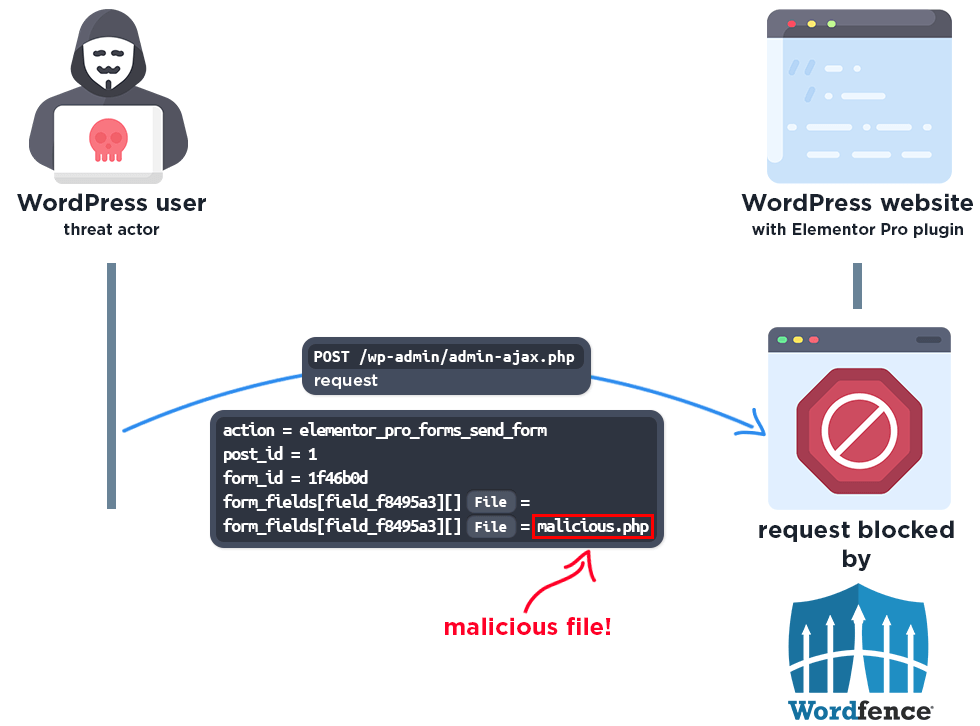
The Wordfence firewall’s built-in Malicious File Upload protection detects the attempt to upload an executable file and blocks the request.
The firewall also blocks access to the php file:
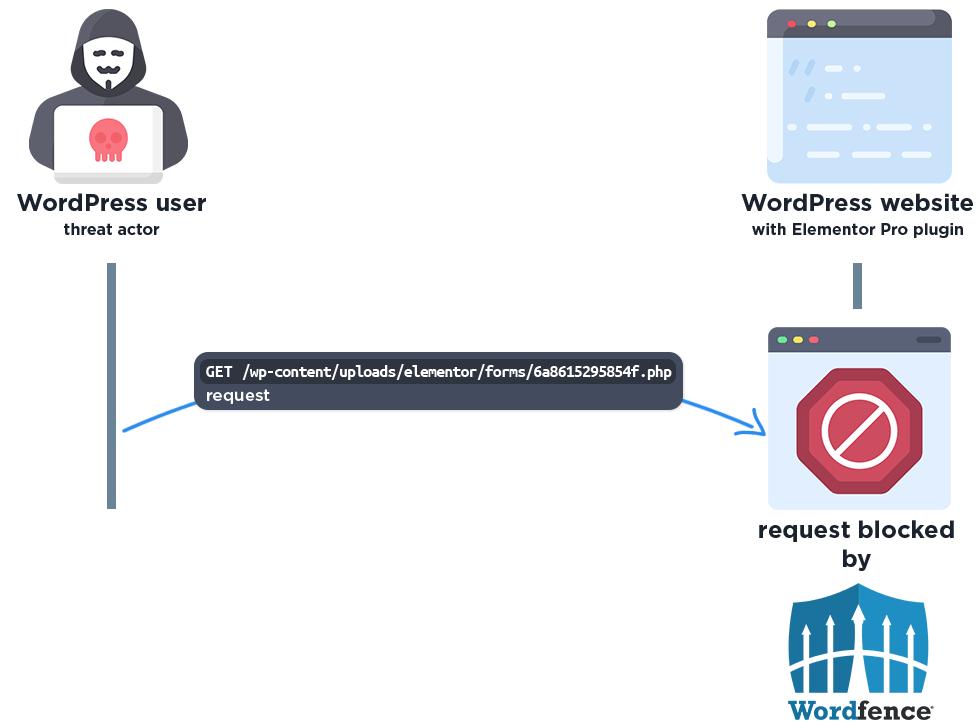
Please note this protection only works if the “Disable Code Execution for Uploads directory” option is enabled in the Wordfence Global Options page. We strongly recommend all Wordfence users enable this option.
Disclosure Timeline
July 24, 2026 – We received the submission for the Unauthenticated Arbitrary File Upload vulnerability in Elementor Pro via the Wordfence Bug Bounty Program.
July 27, 2026 – We validated the report and confirmed the proof-of-concept exploit, and disclosed the vulnerability to the vendor.
August 2, 2026 – The vendor informs us that another researcher has also reported this vulnerability and that they are working on a patch.
August 19, 2026 – The fully patched version of the plugin, 4.2.2, was released.
Conclusion
In this blog post, we detailed an Unauthenticated Arbitrary File Upload vulnerability within the Elementor Pro plugin affecting all versions up to, and including, 4.2.1. This vulnerability allows unauthenticated threat actors to upload executable PHP files to a vulnerable site and achieve remote code execution by exploiting a validation loop that aborts early on a non-required File Upload field. The vulnerability has been fully addressed in version 4.2.2 of the plugin.
We encourage WordPress users to verify that their sites are updated to the latest patched version of Elementor Pro as soon as possible considering the critical nature of this vulnerability.
All Wordfence users, including those running Wordfence Premium, Wordfence Care, and Wordfence Response, as well as sites running the free version of Wordfence, are fully protected against this vulnerability by the Wordfence firewall’s built-in Malicious File Upload protection.
If you know someone who uses this plugin on their site, we recommend sharing this advisory with them to ensure their site remains secure, as this vulnerability poses a significant risk.
The post Critical Arbitrary File Upload Vulnerability Patched in Elementor Pro WordPress Plugin appeared first on Wordfence.